SELECT statement (1)
Outline
Functionality and syntax
- Functionality
- SELECT statement retrieves data from a relational database
- The results of SELECT statement can be considered as a transient relational table
- The results of SELECT statement can be saved as a persistent relational table
Functionality and syntax
- Selection queries select complete rows from a relational table
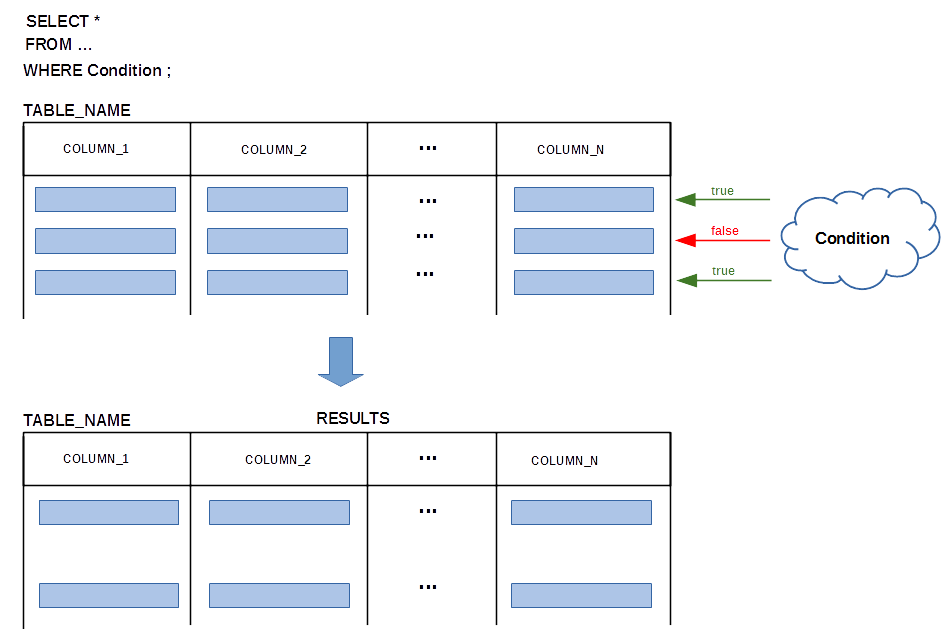
Functionality and syntax
- Projection queries select complete columns from a relational table
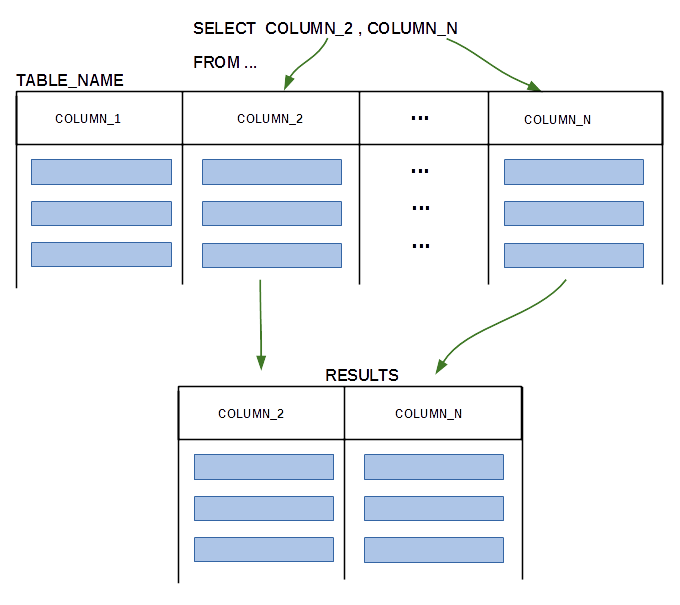
Functionality and syntax
- Sample database
CREATE TABLE DEPARTMENT(
 name               VARCHAR(50)        NOT NULL,
 code               CHAR(5)            NOT NULL,
 total_staff_number DECIMAL(2)         NOT NULL,
 chair              VARCHAR(50)            NULL,
 budget             DECIMAL(9,1)           NULL, /* In this presentation */
  CONSTRAINT dept_pkey PRIMARY KEY(name),        /*  budget can be NULL  */
  CONSTRAINT dept_ckey1 UNIQUE(code),
  CONSTRAINT dept_ckey2 UNIQUE(chair),
  CONSTRAINT dept_check1 CHECK (total_staff_number BETWEEN 1 AND 50) );
 CREATE TABLE COURSE(
 cnum               CHAR(7)           NOT NULL,
 title              VARCHAR(200)      NOT NULL,
 credits            DECIMAL(2)        NOT NULL,
 offered_by         VARCHAR(50)           NULL,
  CONSTRAINT course_pkey PRIMARY KEY(cnum),
  CONSTRAINT course_check1 CHECK (credits IN (6, 12)),
  CONSTRAINT course_fkey1 FOREIGN KEY(offered_by)
                        REFERENCES DEPARTMENT(name) ON DELETE CASCADE );
Functionality and syntax
- Examples
- Find a name and code of a department that has more than 30 staff members
SELECT code, name
FROM DEPARTMENT
WHERE total_staff_number > 30;
- Find a code of a department and course number such that a course is offered by a department and a course provides 6 credit points
SELECT DEPARTMENT.code, COURSE.cnum, title
FROM DEPARTMENT JOIN COURSE
                ON DEPARTMENT.name = COURSE.offered_by
WHERE credits = 6;
SELECT *
FROM COURSE
WHERE offered_by IN ( SELECT name
                      FROM DEPARTMENT
                      WHERE chair = 'James Bond' );
Functionality and syntax
- Examples
- Find all information about courses offered by a department whose chair is James Bond
SELECT COURSE.* FROM COURSE JOIN ( SELECT name FROM DEPARTMENT WHERE chair = 'James Bond' ) JB ON COURSE.offered_by = JB.name; - Find all information about courses offered by a department whose chair is James Bond
WITH JAMES AS
	  ( SELECT name
            FROM DEPARTMENT
            WHERE chair = 'James Bond' ),
     JAMESCOURSE AS
          ( SELECT *
            FROM COURSE JOIN JAMES
            ON COURSE.offered_by = JAMES.name )
SELECT JAMESCOURSE.* FROM JAMESCOURSE;
Functionality and syntax
- Keywords
SELECT code, name
FROM DEPARTMENT
WHERE total_staff_number > 30;
SELECT code, cnum, title
FROM DEPARTMENT, COURSE
WHERE name = offered_by AND credits = 6;
SELECT *
FROM COURSE
WHERE offered_by IN ( SELECT name
                      FROM DEPARTMENT
                      WHERE chair = 'James Bond' );
SELECT COURSE.* FROM COURSE JOIN ( SELECT name FROM DEPARTMENT WHERE chair = 'James Bond' ) JB ON COURSE.offered_by = JB.name;
Functionality and syntax
- Selected columns
SELECT code, name
FROM DEPARTMENT
WHERE total_staff_number > 30;
SELECT code, cnum, title
FROM DEPARTMENT, COURSE
WHERE name = offered_by AND credits = 6;
SELECT *
FROM COURSE
WHERE offered_by IN ( SELECT name
                      FROM DEPARTMENT
                      WHERE chair = 'James Bond' );
SELECT COURSE.* FROM COURSE JOIN ( SELECT name FROM DEPARTMENT WHERE chair = 'James Bond' ) JB ON COURSE.offered_by = JB.name;
Functionality and syntax
- Relational tables used
SELECT code, name
FROM DEPARTMENT
WHERE total_staff_number > 30;
SELECT code, cnum, title
FROM DEPARTMENT, COURSE
WHERE name = offered_by AND credits = 6;
SELECT *
FROM COURSE
WHERE offered_by IN ( SELECT name
                      FROM DEPARTMENT
                      WHERE chair = 'James Bond' );
SELECT COURSE.* FROM COURSE JOIN ( SELECT name FROM DEPARTMENT WHERE chair = 'James Bond' ) JB ON COURSE.offered_by = JB.name;
Functionality and syntax
- Conditions
SELECT code, name
FROM DEPARTMENT
WHERE total_staff_number > 30;
SELECT code, cnum, title
FROM DEPARTMENT, COURSE
WHERE name = offered_by AND credits = 6;
SELECT *
FROM COURSE
WHERE offered_by IN ( SELECT name
                      FROM DEPARTMENT
                      WHERE chair = 'James Bond' );
SELECT COURSE.* FROM COURSE JOIN ( SELECT name FROM DEPARTMENT WHERE chair = 'James Bond' ) JB ON COURSE.offered_by = JB.name;
Functionality and syntax
- Subqueries
SELECT *
FROM COURSE
WHERE offered_by IN ( SELECT name
                      FROM DEPARTMENT
                      WHERE chair = 'James Bond' );
SELECT COURSE.* FROM COURSE JOIN ( SELECT name FROM DEPARTMENT WHERE chair = 'James Bond' ) JB ON COURSE.offered_by = JB.name;
Functionality and syntax
- WITH clause
WITH JAMES AS
	  ( SELECT name
            FROM DEPARTMENT
            WHERE chair = 'James Bond' ),
     JAMESCOURSE AS
          ( SELECT *
            FROM COURSE JOIN JAMES
            ON COURSE.offered_by = JAMES.name )
SELECT JAMESCOURSE.*
FROM JAMESCOURSE;
SELECT statement (1)
Outline
Projection queries
- Projection queries select the entire columns from a relational table and do not have WHERE clause
- Find full information about all departments
SELECT code, name, total_staff_number, chair, budget
FROM DEPARTMENT;
SELECT *
FROM DEPARTMENT;
SELECT name, chair
FROM DEPARTMENT;
SELECT title
FROM COURSE;
Projection queries with duplicates/ no duplicates
- A keyword DISTINCT can be used to eliminated duplicates from the results of a query
- Find the credit points of all courses
SELECT credits
FROM COURSE;
SELECT DISTINCT credits
FROM COURSE;
SELECT DISTINCT total_staff_number
FROM DEPARTMENT;
SELECT statement (1)
Outline
Queries with row functions
- A row function is called and it is processed one time for each row selected from a relational table
- List the names of departments in uppercase format
SELECT UPPER(name)
FROM DEPARTMENT;
SELECT SUBSTR(cnum, 1, 3), title
FROM COURSE;
SELECT name, 1.1*IFNULL(budget,0)
FROM DEPARTMENT;
SELECT statement (1)
Outline
Queries with group functions
- A group function is called and it is processed one time for a group of rows
- Find the total number of courses
SELECT COUNT(*)
FROM COURSE;
SELECT SUM(total_staff_number)
FROM DEPARTMENT;
SELECT AVG(IFNULL(budget, 0))
FROM DEPARTMENT;
SELECT MAX(total_staff_number)
FROM DEPARTMENT;
SELECT statement (1)
Outline
Special queries
- SQL as a calculator
- Compute 30 hours * $90.30 per hour
SELECT 30 * 90.30
FROM DUAL;
SELECT DATE_ADD(SYSDATE(), INTERVAL 1 DAY)
FROM DUAL;
SELECT DATE_ADD(SYSDATE(), INTERVAL 2 MONTH )
FROM DUAL;
Special queries
- How many days have passed since 1 January 2001 ?
SELECT DATEDIFF(SYSDATE(),'2001-01-01')
FROM DUAL;
SELECT CONCAT('I am ', CURRENT_USER())
FROM DUAL;
SELECT 'Hello world !'
FROM DUAL;
SELECT SUBSTR('Hello world', INSTR('Hello world','e'), LENGTH('Hello world'))
FROM DUAL;
References
- C. Coronel, S. Morris, A. Basta, M. Zgola, Data Management and Security, Chapter 5 Introduction to Structured Query Language, Cengage Compose eBook, 2018, eBook: Data Management and Security, 1st Edition
- T. Connoly, C. Begg, Database Systems, A Practical Approach to Design, Implementation, and Management, Chapters 6.3.1 - 6.3.4 Data Manipulation, Pearson Education Ltd, 2015
- D. Darmawikarta, SQL for MySQL A Beginner’s Tutorial, Chapters 2 - 5, Brainy Software Inc. First Edition: June 2014
- How to ... ? Cookbook, How to implement queries in SQL, Recipe 5.1 How to implement SELECT statements with simple Boolean expressions ?