SELECT statement (3)
Outline
Join queries
- Join operation "connects" the rows from two relational tables
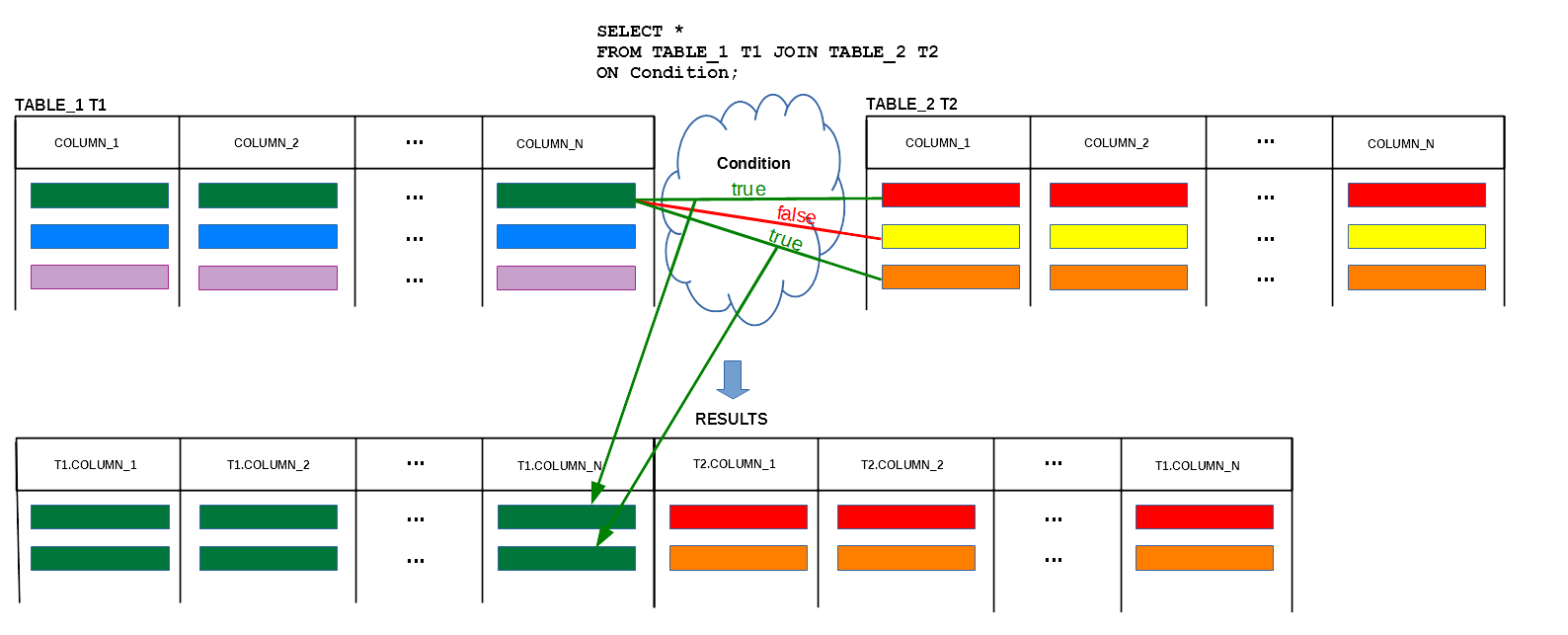
Join queries
- Join operation "connects" the rows from two relational tables
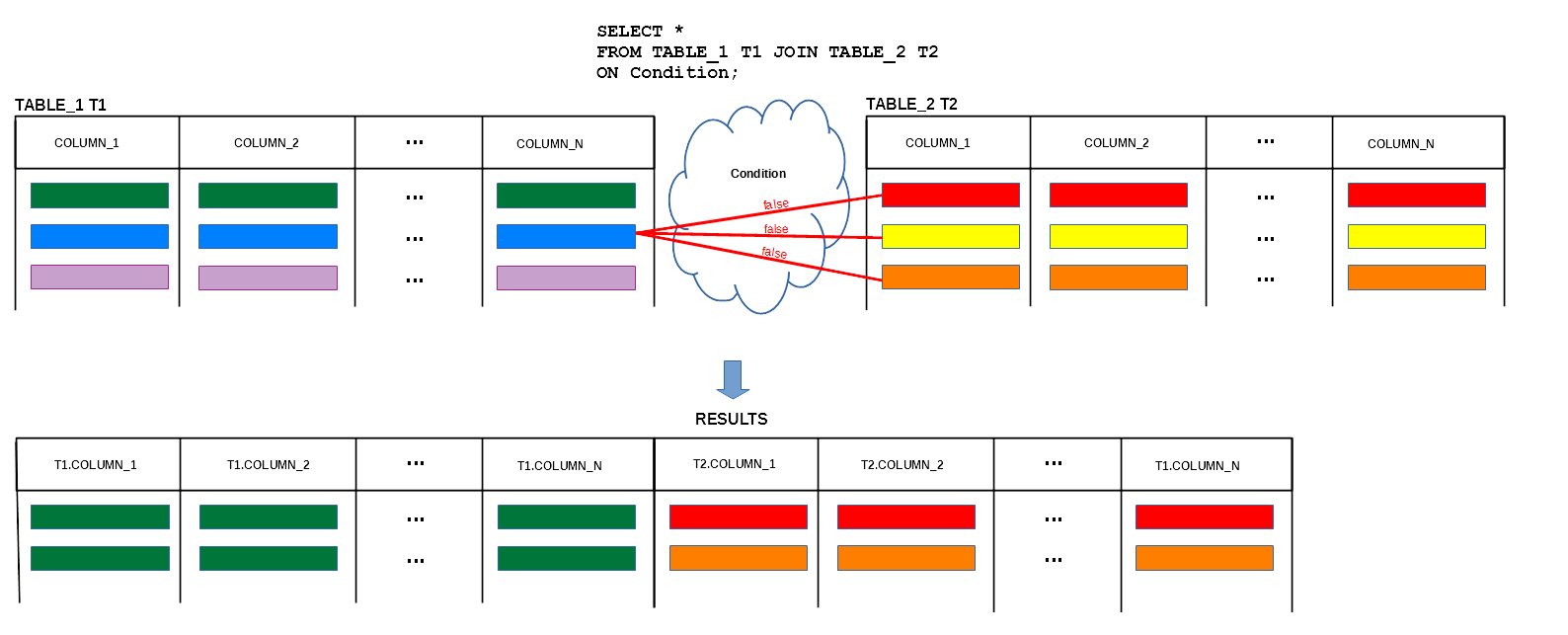
Join queries
- Join operation "connects" the rows from two relational tables
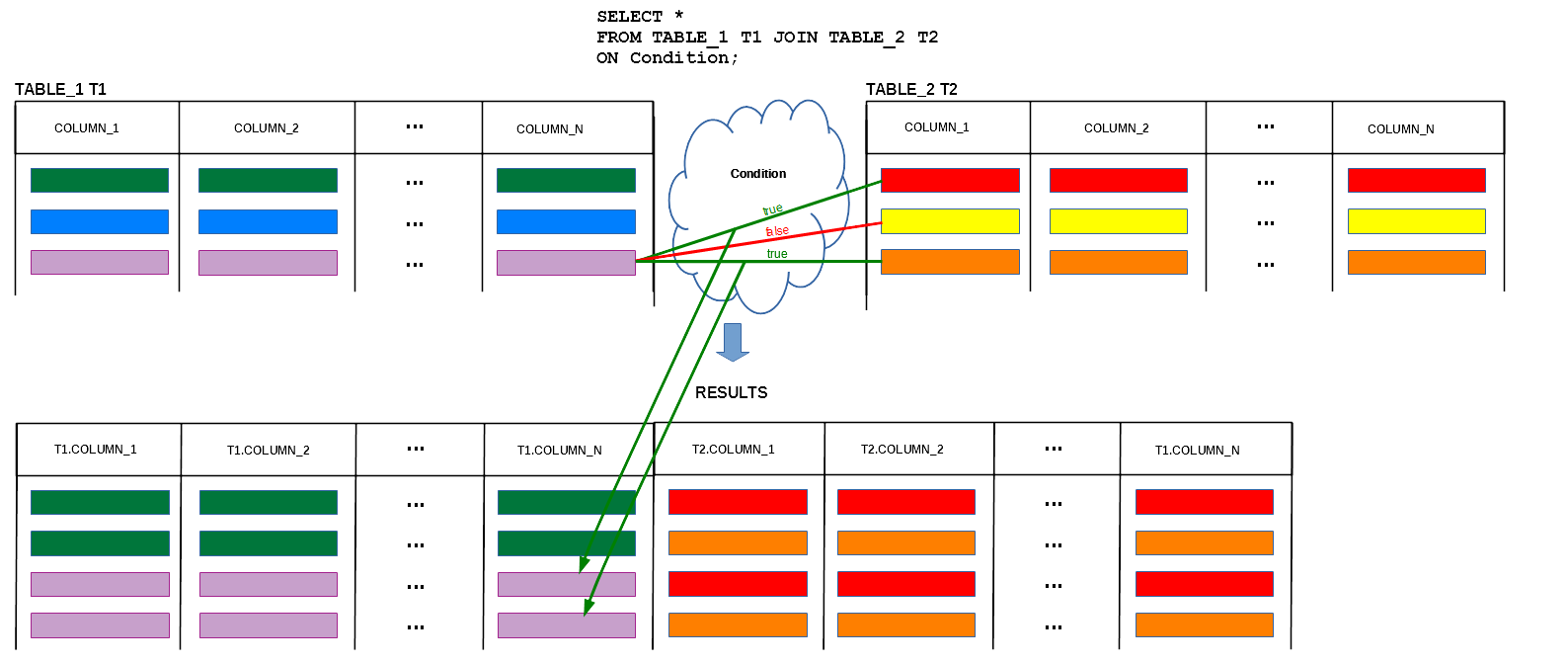
Join queries
- Sample database
CREATE TABLE DEPARTMENT(
 name               VARCHAR(50)        NOT NULL,
 code               CHAR(5)            NOT NULL,
 total_staff_number DECIMAL(2)         NOT NULL,
 chair              VARCHAR(50)            NULL,
 budget             DECIMAL(9,1)       NOT NULL,
  CONSTRAINT dept_pkey PRIMARY KEY(name),
  CONSTRAINT dept_ckey1 UNIQUE(code),
  CONSTRAINT dept_ckey2 UNIQUE(chair),
  CONSTRAINT dept_check1 CHECK (total_staff_number BETWEEN 1 AND 50) );
CREATE TABLE COURSE(
 cnum               CHAR(7)           NOT NULL,
 title              VARCHAR(200)      NOT NULL,
 credits            DECIMAL(2)        NOT NULL,
 offered_by         VARCHAR(50)           NULL,
  CONSTRAINT course_pkey PRIMARY KEY(cnum),
  CONSTRAINT course_check1 CHECK (credits IN (6, 12)),
  CONSTRAINT course_fkey1 FOREIGN KEY(offered_by)
                        REFERENCES DEPARTMENT(name) ON DELETE CASCADE );
Join queries
- Consider the following query: Find the titles of all courses offered by a department
chaired by Peter
DEPARTMENT
name | code | total_staff_number | chair | budget
- There are no titles of courses in a relational table DEPARTMENT !
- The titles of courses are in a relational table COURSE
COURSE
cnum | title | credits | offered_by
SELECT COURSE.title
FROM COURSE JOIN DEPARTMENT
            ON DEPARTMENT.name = COURSE.offered_by
WHERE DEPARTMENT.chair = 'Peter';
Join queries
- Implementation of the query Find the titles of all courses offered by a department
chaired by Peter has the following syntactical variations
SELECT title
FROM COURSE JOIN DEPARTMENT
            ON name = offered_by
WHERE chair = 'Peter';
SELECT C.title FROM COURSE C JOIN DEPARTMENT D ON D.name = C.offered_by WHERE D.chair = 'Peter';SELECT COURSE.title FROM COURSE, DEPARTMENT WHERE DEPARTMENT.name = COURSE.offered_by AND DEPARTMENT.chair = 'Peter';
SELECT title
FROM COURSE, DEPARTMENT
WHERE name = offered_by AND chair = 'Peter';
ANSI SQL Syntax
- The following implementations of the query Find the titles of all courses offered by a department
chaired by Peter are consistent with ANSI SQL standard
SELECT COURSE.title
FROM COURSE JOIN DEPARTMENT
            ON DEPARTMENT.name = COURSE.offered_by
WHERE DEPARTMENT.chair = 'Peter';
SELECT title FROM COURSE JOIN DEPARTMENT ON name = offered_by WHERE chair = 'Peter';SELECT C.title FROM COURSE C JOIN DEPARTMENT D ON D.name = C.offered_by WHERE D.chair = 'Peter';
SELECT statement (3)
Outline
Natural join queries
- Consider a query: Find the names of all employees from a department chaired by James Bond, that requires the following relational tables:
DEPARTMENT
			dname | code | total staff number | chair | budget
EMPLOYEE
			enum | ename | dname
SELECT ename
FROM EMPLOYEE NATURAL JOIN DEPARTMENT
WHERE chair = 'James Bond';
SELECT ename
FROM EMPLOYEE JOIN DEPARTMENT
              ON EMPLOYEE.dname = DEPARTMENT.dname
WHERE chair = 'James Bond';
SELECT statement (3)
Outline
Column name join queries
- Consider a query: Find the names of all employees from a department chaired by James Bond, that requires the following relational tables:
DEPARTMENT
			dname | code | total staff number | chair | budget
EMPLOYEE
			enum | ename | dname
SELECT ename
FROM EMPLOYEE JOIN DEPARTMENT
              USING(dname)
WHERE chair = 'James Bond';
SELECT ename
FROM EMPLOYEE JOIN DEPARTMENT
              ON  EMPLOYEE.dname = DEPARTMENT.dname
WHERE chair = 'James Bond';
SELECT statement (3)
Outline
Cross join queries
- Cross join operation "connects" all rows from a relational table with all rows from another relational table
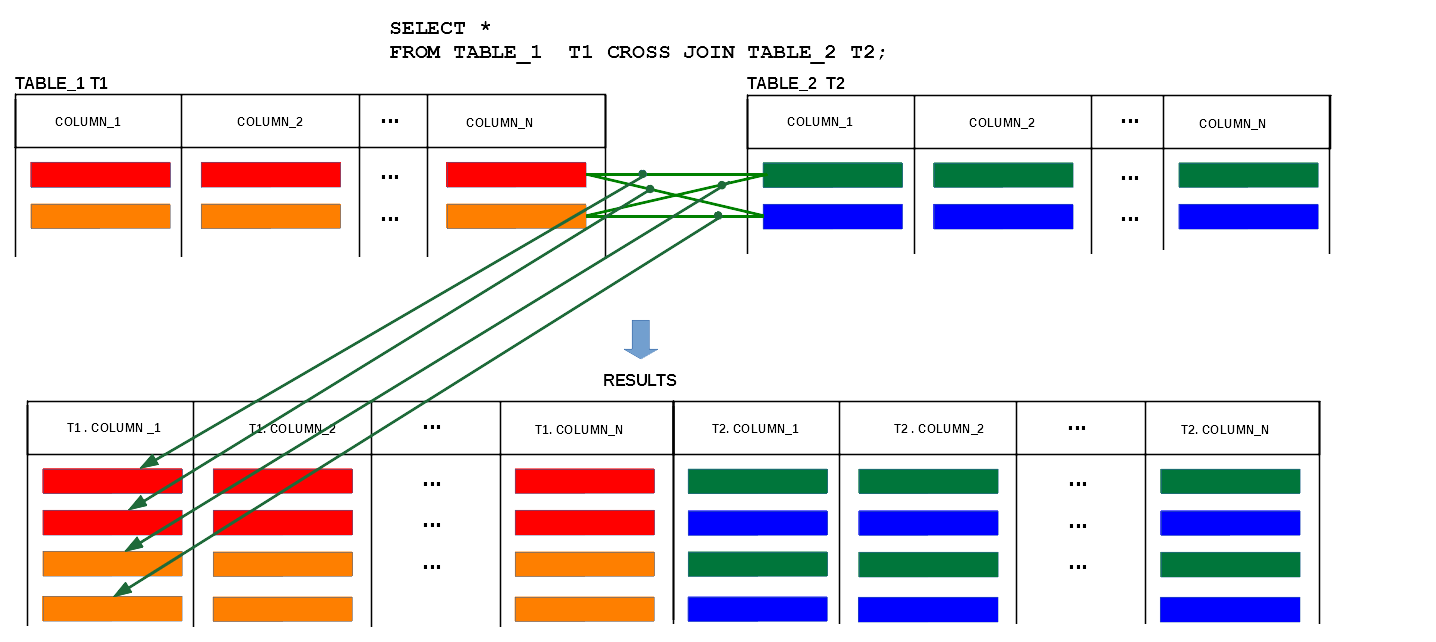
Cross join queries
- Consider a query: Find all pairs of the names of employees and the names of chair people, that requires the following relational tables:
DEPARTMENT
			dname | code | total staff number | chair | budget
EMPLOYEE
			enum | ename | dname
SELECT ename, chair
FROM EMPLOYEE CROSS JOIN DEPARTMENT;
SELECT ename, chair
FROM EMPLOYEE JOIN DEPARTMENT;
SELECT ename, chair
FROM EMPLOYEE, DEPARTMENT;
SELECT statement (3)
Outline
Join queries over more than 2 tables
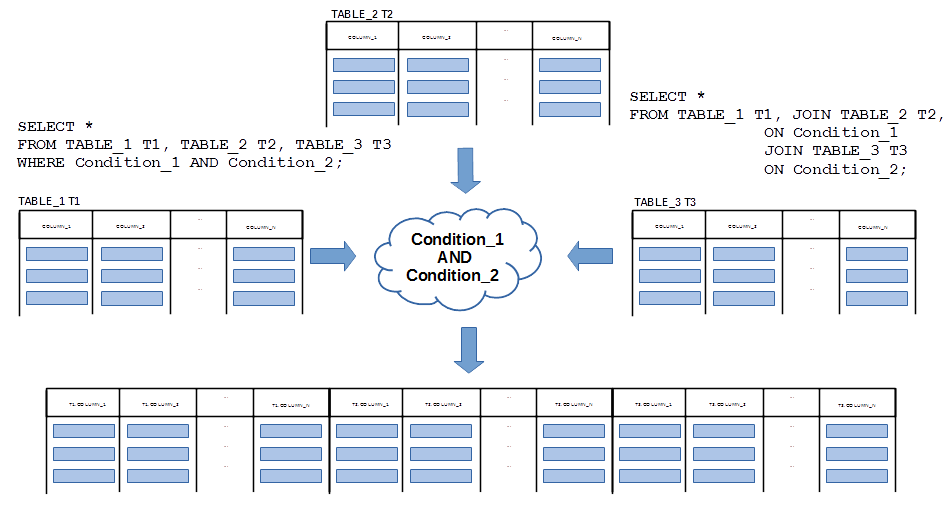
- A sample join of three relational tables TABLE_1, TABLE_2, and TABLE_3
Join queries over more than 2 tables
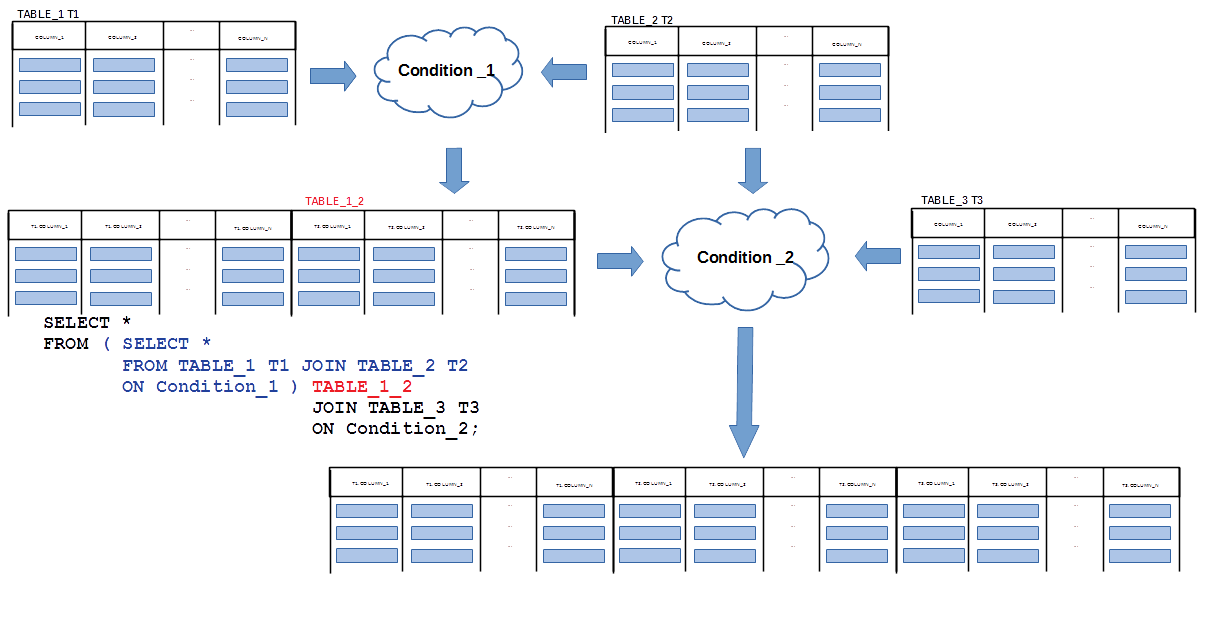
- Application of inline view to simplify join of three relational tables TABLE_1, TABLE_2, and TABLE_3
Join queries over more than 2 tables
- Consider the relational tables with the following schemas
COURSE
       cnum | title | credits
STUDENT snum | name | degreeENROLMENT cnum | snum | edate | result
SELECT STUDENT.name
FROM COURSE JOIN ENROLMENT
            ON COURSE.cnum = ENROLMENT.cnum
            JOIN STUDENT
            ON ENROLMENT.snum = STUDENT.snum
WHERE COURSE.title = 'Java';
Join queries over more than 2 tables
- Implementation of a query find the names of all students who enrolled Java course has the following syntactical variations
SELECT STUDENT.name
FROM COURSE JOIN ENROLMENT
            ON COURSE.cnum = ENROLMENT.cnum
            JOIN STUDENT
            ON ENROLMENT.snum = STUDENT.snum
WHERE COURSE.title = 'Java';
SELECT STUDENT.name FROM COURSE, ENROLMENT, STUDENT WHERE COURSE.cnum = ENROLMENT.cnum AND ENROLMENT.snum = STUDENT.snum AND COURSE.title = 'Java';SELECT STUDENT.name FROM ( SELECT * FROM COURSE JOIN ENROLMENT ON COURSE.cnum = ENROLMENT.cnum WHERE COURSE.title = 'Java' ) CE JOIN STUDENT ON CE.snum = STUDENT.snum WHERE COURSE.title = 'Java';
SELECT statement (3)
Outline
Self-join queries
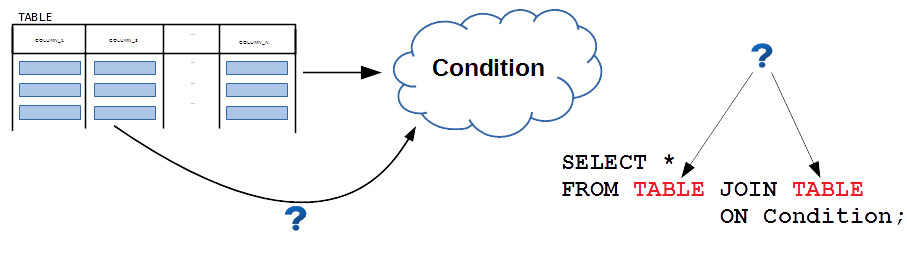
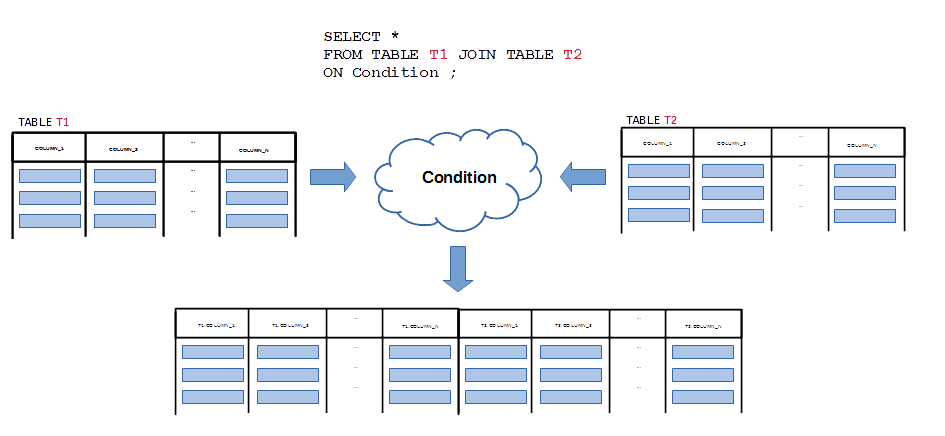
- What if a relational table must be joined with itself ?
- A table, that must be joined with itself obtains two different alias names
Self-join queries
- Consider a relational table with the following schema:
EMPLOYEE
	enum, name, manager
+------+-------+---------+
| enum | name  | manager |
+------+-------+---------+
|   10 | John  |    NULL |
|   20 | Peter |      10 |
|   30 | Mary  |      10 |
|   40 | Mike  |      20 |
|   50 | Kate  |      20 |
|   60 | Greg  |      50 |
|   70 | Phil  |      50 |
+------+-------+---------+
- (1) Find an employee number of manager of employee number 40
- (2) Find a name of employee found in the previous query
Self-join queries
- Implementation of a plan:
- (1) Find employee number of manager of employee number 40
- (2) Find a name of employee found in the previous query
- is the following:
SELECT manager
FROM EMPLOYEE
WHERE enum = 40;
20
SELECT name
FROM EMPLOYEE
WHERE enum = 20;
Peter
Self-join queries
- Solution 1
- Assume that we have two identical relational tables E1 and E2
E1                                     E2
+------+-------+---------+             +------+-------+---------+
| enum | name  | manager |             | enum | name  | manager |
+------+-------+---------+             +------+-------+---------+
|   10 | John  |    NULL |             |   10 | John  |    NULL |
|   20 | Peter |      10 |    -------->|   20 | Peter |      10 |
|   30 | Mary  |      10 |    |        |   30 | Mary  |      10 |
|   40 | Mike  |      20 |-----        |   40 | Mike  |      20 |
|   50 | Kate  |      20 |             |   50 | Kate  |      20 |
|   60 | Greg  |      50 |             |   60 | Greg  |      50 |
|   70 | Phil  |      50 |             |   70 | Phil  |      50 |
+------+-------+---------+             +------+-------+---------+
| 40 | Mike | 20 |
| 20 | Peter | 10 |
Self-join queries
- So, how do we implement such "magic" ?
SELECT E2.name
FROM EMPLOYEE E1 JOIN EMPLOYEE E2
                 ON E1.manager = E2.enum
WHERE E1.enum = 40;
E1 E2 +------+-------+---------+ +------+-------+---------+ | enum | name | manager | | enum | name | manager | +------+-------+---------+ +------+-------+---------+ | 10 | John | NULL | | 10 | John | NULL | | 20 | Peter | 10 | -------->| 20 | Peter | 10 | | 30 | Mary | 10 | | | 30 | Mary | 10 | | 40 | Mike | 20 |----- | 40 | Mike | 20 | | 50 | Kate | 20 | | 50 | Kate | 20 | | 60 | Greg | 50 | | 60 | Greg | 50 | | 70 | Phil | 50 | | 70 | Phil | 50 | +------+-------+---------+ +------+-------+---------+
Self-join queries
- Solution 2
- We use inline views technique to combine the following queries
SELECT manager
FROM EMPLOYEE
WHERE enum = 40;
SELECT name
FROM EMPLOYEE
WHERE enum = 20;
( SELECT manager
FROM EMPLOYEE
WHERE enum = 40 ) E40
SELECT EMPLOYEE.name
FROM EMPLOYEE JOIN ( SELECT manager
                     FROM EMPLOYEE
                     WHERE enum = 40 ) E40
              ON EMPLOYEE.enum = E40.manager;
Self-join queries
- In another query we find the names of all employees directly managed by Kate
+------+-------+---------+
| enum | name  | manager |
+------+-------+---------+
|   10 | John  |    NULL |
|   20 | Peter |      10 |
|   30 | Mary  |      10 |
|   40 | Mike  |      20 |
|   50 | Kate  |      20 |
|   60 | Greg  |      50 |
|   70 | Phil  |      50 |
+------+-------+---------+
- (1) Find an employee number of an employee Kate
- (2) Find the names of employees who have a number found in the previous query in a column manager
Self-join queries
- Solution 1
- Assume that we have two identical relational tables E1 and E2
E1                                     E2
+------+-------+---------+             +------+-------+---------+
| enum | name  | manager |             | enum | name  | manager |
+------+-------+---------+             +------+-------+---------+
|   10 | John  |    NULL |             |   10 | John  |    NULL |
|   20 | Peter |      10 |             |   20 | Peter |      10 |
|   30 | Mary  |      10 |             |   30 | Mary  |      10 |
|   40 | Mike  |      20 |             |   40 | Mike  |      20 |
|   50 | Kate  |      20 |    -------- |   50 | Kate  |      20 |
|   60 | Greg  |      50 |<---|        |   60 | Greg  |      50 |
|   70 | Phil  |      50 |<---|        |   70 | Phil  |      50 |
+------+-------+---------+             +------+-------+---------+
| 50 | Kate | 20 |
| 60 | Greg | 50 |
| 70 | Phil | 50 |
Self-join queries
- So, how do we implement such "magic" ?
SELECT E1.name
FROM EMPLOYEE E1 JOIN EMPLOYEE E2
                 ON E1.manager = E2.enum
WHERE E2.name = 'Kate';
E1 E2 +------+-------+---------+ +------+-------+---------+ | enum | name | manager | | enum | name | manager | +------+-------+---------+ +------+-------+---------+ | 10 | John | NULL | | 10 | John | NULL | | 20 | Peter | 10 | | 20 | Peter | 10 | | 30 | Mary | 10 | | 30 | Mary | 10 | | 40 | Mike | 20 | | 40 | Mike | 20 | | 50 | Kate | 20 | -------- | 50 | Kate | 20 | | 60 | Greg | 50 |<---| | 60 | Greg | 50 | | 70 | Phil | 50 |<---| | 70 | Phil | 50 | +------+-------+---------+ +------+-------+---------+
Self-join queries
- Solution 2
- We use inline views technique to combine the following queries
SELECT enum
FROM EMPLOYEE
WHERE name = 'Kate';
SELECT name
FROM EMPLOYEE
WHERE manager = 50;
( SELECT enum
  FROM EMPLOYEE
  WHERE name = 'Kate' ) KATE
SELECT EMPLOYEE.name
FROM EMPLOYEE JOIN ( SELECT enum
                     FROM EMPLOYEE
                     WHERE name = 'Kate' ) KATE
              ON EMPLOYEE.manager = KATE.enum;
References
- C. Coronel, S. Morris, A. Basta, M. Zgola, Data Management and Security, Chapters 5, 7, Cengage Compose eBook, 2018, eBook: Data Management and Security, 1st Edition
- T. Connoly, C. Begg, Database Systems, A Practical Approach to Design, Implementation, and Management, Chapters 6.3.7 Multi-table Queries, Pearson Education Ltd, 2015
- D. Darmawikarta, SQL for MySQL A Beginner’s Tutorial, Chapter 6, pages 55 - 61 Brainy Software Inc. First Edition: June 2014
- How to ... ? Cookbook, How to implement queries in SQL ? (Part 1), Recipe 5.4 How to implement simple join queries ?
- How to ... ? Cookbook, How to implement queries in SQL ? (Part 2) Recipe 6.1 How to implement self join queries ?