MongoDB Data Manipluations
Outline
A sample database
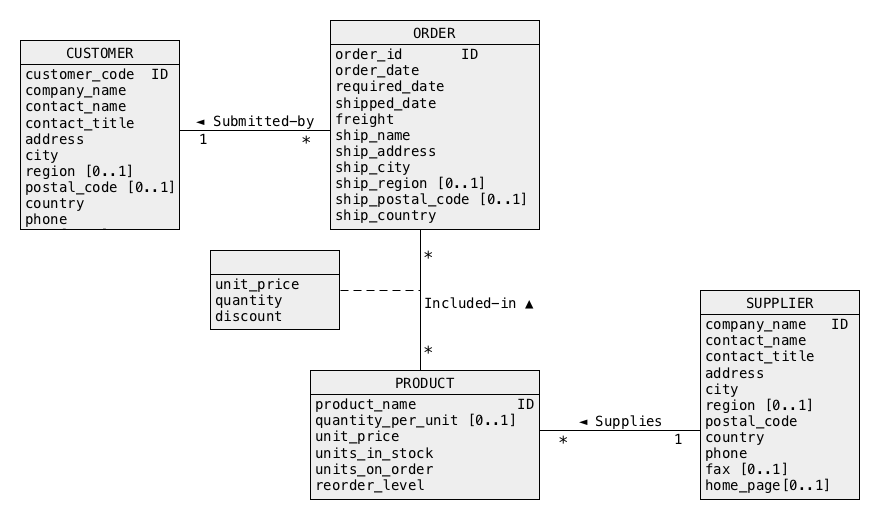
- A conceptual schema of a database with information about suppliers, products, customers, orders, and details of orders
A sample database
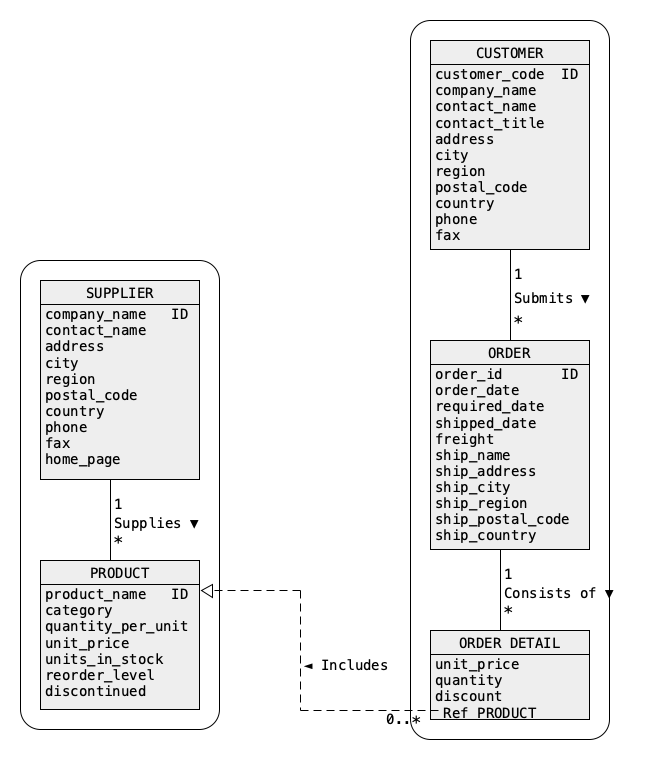
- A sample collection orders
A sample database
- A sample document, that belongs to a class CUSTOMER
{
        "_id":"ALFKI",
        "CUSTOMER":{
                 "customer code":"ALFKI",
                 "company name":"Alfreds Futterkiste",
                 "contact name":"Maria Anders",
                 "contact title":"Sales Representative",
                 "address":"Obere Str. 57",
                 "city":"Berlin",
                 "region":null,
                 "postal code":"12209",
                 "country":"Germany",
                 "phone":"030-0074321",
                 "fax":"030-0076545",
                 "submits":[ ]
        }
}
A sample database
- A sample nested document, that belongs to a class CUSTOMER
{
 "_id":"FAMIA",
 "CUSTOMER":{
               "customer code":"FAMIA",
                ...  ...  ...  ...  ...  ...
               "submits":[
                            {
                             "ORDER":{
                                        "order id":328,
                                         ...  ...  ...  ...  ...
                                        "consists of":[
                                                         {
                                                          "ORDER DETAIL":{
                                                                            "product name":"Louisiana Fiery Hot Pepper Sauce",
                                                                            ...  ...  ...  ...  ...
                                                                           }
                                                         },
                                                         {
                                                          "ORDER DETAIL":{
                                                                            "product name":"Raclette Courdavault",
	                                                                    ...  ...  ...  ...  ...
                                                                           }
                                                         }
                                                        ]
                                       }
                            }
 ] } }
A sample database
- A sample nested document, that belongs to a class SUPPLIER
{
 "_id":"Karkki Oy",
 "SUPPLIER":{
               "company name":"Karkki Oy",
               "contact name":"Anne Heikkonen",
               "contact title":"Product Manager",
               "address":"Valtakatu 12",
               ...  ...  ...  ...  ...  ...
               "supplies":[
                             {
                              "PRODUCT":{
                                           "product name":"Maxilaku",
                                           "category name":"Confections",
                                            ...  ...  ...  ...  ...
                                          }
                             },
                             {
                              "PRODUCT":{
                                           "product name":"Valkoinen suklaa",
                                           "category name":"Confections",
                                           ...  ...  ...  ...  ...
                                          }
                             }

                            ]
              }
}
MongoDB Data Manipluations
Outline
Inserting documents
- A method insert() can be used to insert a single document
into a collection
db.orders.insert(
      {
        "_id":"ALFKI",
        "CUSTOMER":{
                      "customer code":"ALFKI",
                      "company name":"Alfreds Futterkiste",
                      "contact name":"Maria Anders",
                      "contact title":"Sales Representative",
                      "address":"Obere Str. 57",
                      "city":"Berlin",
                      "region":null,
                      "postal code":"12209",
                      "country":"Germany",
                      "phone":"030-0074321",
                      "fax":"030-0076545",
                      "submits":[ ]
                     }
      }
)
Inserting documents
- It is possible to insert many documents in one call
db.department.insert(
    [ {"_id":"ANATR",
       "CUSTOMER":{
	           "customer code":"ANATR",
	           "company name":"Ana Trujillo Emparedados y helados",
	           "contact name":"Ana Trujillo",
	           "contact title":"Owner",
                   "submits":[ ]
	          }
      },
      {"_id":"Aux joyeux ecclesiastiques",
       "SUPPLIER":{
                   "company name":"Aux joyeux ecclesiastiques",
                   "contact name":"Guylene Nodier",
	           "contact title":"Sales Manager",
	           "supplies": [ ]
                  }
      }
    ]
)
Inserting documents
- Restrictions on insertions:
- It is impossible to insert two documents with the same "_id" into the same collection
- Insertion of many documents with one call can be done only into one collection
- There is a limit on much data can be inserted in one inserts (48Mb)
- If insertion of many documents with one call fails then entire operation is not rolled back (partial insertion)
- An inserted document must be smaller than 16Mb
MongoDB Data Manipluations
Outline
Removing documents
- A method remove() can be used to remove the documents from a collection
- Remove all documents from a collection orders
db.orders.remove({})
db.orders.remove({"CUSTOMER":{$exists:true}})
db.orders.remove({"SUPPLIER.supplies":[]})
db.orders.drop()
MongoDB: Data Manipluationss
Outline
Updating documents
- Replace a document that describes a customer with customer code ALFKI with a new document
db.orders.update({"CUSTOMER.customer code":"ALFKI"},
   	         {"_id":"ALFKI",
                  "CUSTOMER":{"customer code" :"ALFKI",
                              "company name":"Alfreds Futterkiste",
                              "contact name":"James Bond",
                              "contact title":"Sales Representative",
                              "address":"Johan Strauss Str. 23",
                              "city":"Hamburg",
                              "region":null,
                              "postal code":"34567",
                              "country":"Germany",
                              "phone":"030-0074321",
                              "fax":"030-0076545",
                              "submits":[ ]
                             }
                 }
)
Updating documents
- Rename a key contact title into title in all documents describing customers
db.orders.updateMany({"CUSTOMER":{$exists:true}},
                     {$rename:{"CUSTOMER.contact title":"CUSTOMER.title"}})
db.orders.updateOne({"CUSTOMER.customer code":"AROUT"},
                    {$set:{"CUSTOMER.city":"Liverpool"}})
db.orders.updateOne({"CUSTOMER.customer code":"AROUT"},
                    {$set:{"CUSTOMER.city":null}})
db.orders.updateOne({"CUSTOMER.customer code":"AROUT"},
                    {$unset:{"CUSTOMER.city":null}}))
Updating documents
- Change a unit price of a product Guarana Fantastica to 10
db.orders.updateOne({"SUPPLIER.supplies.PRODUCT.product name":"Guarana Fantastica"},
                    {$set:{"SUPPLIER.supplies.$.PRODUCT.unit price":100}}))
db.orders.updateOne({"SUPPLIER.supplies.PRODUCT.product name":"Guarana Fantastica"},
                    {$set:{"SUPPLIER.supplies.$.PRODUCT.unit price":null}}))
db.orders.updateOne({"SUPPLIER.supplies.PRODUCT.product name":"Guarana Fantastica"},
                    {$inc:{"SUPPLIER.supplies.$.PRODUCT.unit price":10}})
 db.orders.updateOne({"SUPPLIER.supplies.PRODUCT.product name":"Guarana Fantastica"},
                     {$mul:{"SUPPLIER.supplies.$.PRODUCT.unit price":2}})
Updating documents
- Remove a key unit price from a description of a product Guarana Fantastica
db.orders.updateOne({"SUPPLIER.supplies.PRODUCT.product name":"Guarana Fantastica"},
                    {$unset:{"SUPPLIER.supplies.$.PRODUCT.unit price":null}}))
db.orders.updateOne({"SUPPLIER.company name":"Exotic Liquids"},
                    {$mul:{"SUPPLIER.supplies.0.PRODUCT.unit price":2}})
db.orders.updateOne({"SUPPLIER.supplies.PRODUCT.product name":"Chai"},
                    {$mul:{"SUPPLIER.supplies.$.PRODUCT.unit price":2}})
Updating documents
- Remove a product Chai supplied by a supplier Exotic Liquids
db.orders.updateOne({"SUPPLIER.company name":"Exotic Liquids"},
                    {$pull:{"SUPPLIER.supplies":{"PRODUCT.product name":"Chai"}}})
db.orders.updateMany({"SUPPLIER.company name":"Bigfoot Breweries"},
                     {$pull:{"SUPPLIER.supplies":{"PRODUCT.discontinued":"Y"}}}))
db.orders.updateOne({"SUPPLIER.company name":"Exotic Liquids"},
                    {$push:{"SUPPLIER.supplies":{"PRODUCT":{"product name":"Champagne",
                                                            "discontinued":"N",
                                                            "unit price":100}}}}))
References
- MongoDB Reference, Operators, Update Operators
- Banker L., Bakkum P., Verch S., Garrett D., Hawkins T., MongoDB in Action, Manning, 2016
- Chodorow K. MongoDB The Definitive Guide, O'Reilly, 2013, chapter 2