Performance Tuning of Relational Database Server
Outline
Top 10 mistakes
- (1) Bad management of database connections
- A database application always connects and disconnects to perform each operation on a database
- (2) Bad use of cursors and Shared Pool
- Not using cursors and bind variables increases time spent on parsing and optimization, dynamic SQL has a negative impact on performance
- (3) Bad SQL
- Processing of SQL statements (especially SELECT) takes more time than processing the same applications with algorithmic codes, relational tables are scanned too many times
- (4) Use of nonstandard initialization parameters
- Setting the unusual values of initialization parameters, using undocumented initialization parameters
- (5) Getting database I/O wrong
- Incorrectly distributing database files over available disk drives
Top 10 mistakes
- (6) Redo log setup problems
- Setting too small redo log buffer, using to small number of too small redo log files
- (7) Lack of freelists, shortage of rollback segments
- Typical for INSERT-heavy applications, too large number of users, no enough rollback segments
- (8) Long full table scans
- Usually, caused by lack of indexing, poor transaction design, poor SQL optimization
- (9) High amount of "recursive" SQL
- Too many accessed to data dictionary caused by too many space management activities, e.g. storage allocation
- (10)Deployment and migration errors
- Usually caused by incomplete migration of relational tables from development environment or legacy systems, e.g. missing indexes, missing statistics from ANALYZE statement
Performance Tuning of Relational Database Server
Outline
Tuning data buffer cache
- How large data buffer cache supposed to be ?
- Consistent gets
- Number of times a block was acquired in a consistent mode, that is with the correct timestamp to provide read consistency
- It is incremented by 1 for each block read during full table scans
- It is incremented by (index height + 2*index key entries) for indexed table lookups
- It is incremented by 1 for each block read during and index-only lookup
- Db block gets
- Number of blocks read for update
- It includes updates to blocks in UNDO and temporary tablespaces
- It is also incremented during extent allocation and when update to high water mark takes place
Tuning data buffer cache
- Logical Reads (LR#)
- LR# = consistent gets + db block gets
- Physical Reads (PR#)
- Number of requests to an operating system to read a database block into data buffer cache
- If a parameter DB_FILE_MULTBLOCK_READ_COUNT is set to more than1 then the physical reads number is incremented only by one
- Reading from temporary tablespace does not increment the number
- Data block buffer hit ratio (H)
- H = ((LR# - PR#)/LR# ) * 100%
- In a well tuned OLTP system H ≥ 95% and H ≤ 85% in OLAP system
Tuning data buffer cache
- Physical I/O versus data buffer cache size
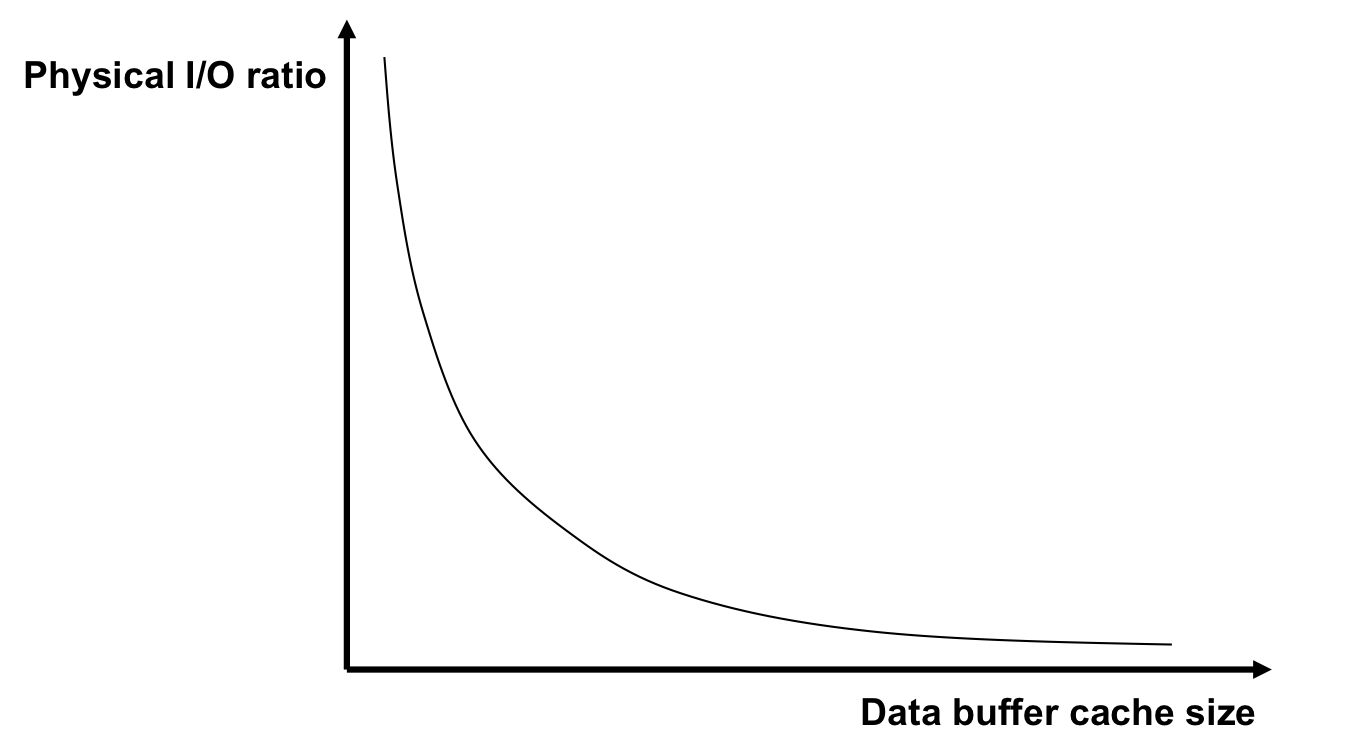
Tuning data buffer cache
- What should be kept where ?
- KEEP pool
- KEEP pool should contain the tables that are frequently referenced by the applications, like small tables with frequent full scans, lookup tables, and data objects that are normally more than 80% cached
- The contents of KEEP pool are not automatically removed or loaded
- KEEP pool should always have data block buffer ratio equal to 100%
- The size of KEEP pool should greater by 20% than the total size of data objects kept there
Tuning data buffer cache
- What should be kept where ?
- RECYCLE pool
- RECYCLE pool should contain the large relational tables which have rare full-table scans such that their data blocks are unlikely to be re-read
- Storing rarely and fully scanned relational tables in RECYCLE pool prevents more frequently used tables and indexes from being flushed out of the system
- The contents of RECYCLE pool are immediately removed after being used
Tuning data buffer cache
- What should be kept where ?
- DEFAULT pool
- DEFAULT pool contains all other data objects that are not assigned to either KEEP or RECYCLE pools
Tuning data buffer cache
- What should be kept where ?
- nK pools
- The significant performance gains can be achieved by switching to a longer data block size
- the tables with long rows have less chained rows
- full table scans and tables with large objects (BLOB, CLOB, ...) benefit from longer blocks because of less read block operations
- index range scans gather index node sequentially, temporary tablespaces used for sorting also need less I/O operations
- On the other hand the tables with smaller rows accessed randomly should be placed in smaller data blocks because they take to much space in data buffer cache
- B-tree indexes should use the largest supported size of data blocks (32K)
- A table should be stored in the data blocks longer than the average row size in the table to prevent row chaining
- TEMP tablespace benefits from the large blocks that allow to minimize disk I/O when sorting
Performance Tuning of Relational Database Server
Outline
Tuning redo log buffer
- Redo log space requests (RLS#)
- The total number of times a user process waits for space in a redo log buffer so that a redo entry can be written there
- Redo entries (RE#)
- The total number of entries written to a redo log buffer due to modifications of data blocks
- Redo log hit ratio (RLH)
- RLH = RLS#/RE#
- It is recommended to have RLH ≤ 1/5000
- In the large OnLine Transaction Processing (OLTP) systems the size of redo log buffer should be from 2M to 4M
Tuning redo log buffer
- Redo log space wait time
- The total elapsed time of waiting for redo log space request; should be close to zero !
- When the system waits for redo log space ?
- The system waits for redo log space when the log writer process (LGWR) is waiting for a disk space
- Disk space is available when a log file switch occurs
- log file switch forces a checkpoint
- Check point means that all "dirty blocks" in data buffer cache must be written to persistent storage (disk drive)
- Consequence of too small redo log buffer
- Smaller redo log buffer forces the log writer process (LGWR) to write to a log file more frequently
Tuning redo log buffer
- How to detect log buffer contention ?
- A simple way to detect redo buffer contention is to analyze the latch usage statistics and in particular find a ratio of gets to misses or a ratio of immediate_gets to immediate_misses
- the ration should not exceed 1%
Performance Tuning of Relational Database Server
Outline
Tuning library cache
- Pin (P#)
- Pin indicates that parse tree of SQL statement to be processed is included in library cache
- Reload (R#)
- Reload indicates a cache miss; a parse tree is not in library cache or it has been removed from a library cache
- Library cache hit ratio (LCH)
- LCH = ( P#/(P# + R# ) ) * 100%
- It is recommended to have LCH ≥ 99%
Tuning library cache
- Principles
- Use as much generic code as possible
- Use bind variables (:v) instead of constants in SQL statements
SELECT *
FROM EMPLOYEE
WHERE E# = 25;
VARIABLE EMPNUM NUMBER
BEGIN
 :EMPNUM := 25;
END;
SELECT *
FROM EMPLOYEE
WHERE E# = :EMPNUM;
- Increase size of library cache when necessary
- Prevent invalidations (a data object used in SQL statement is modified with ALTER, DROP, or ANALYZE statement
Performance Tuning of Relational Database Server
Outline
Tuning dictionary cache
- Get (G#)
- Get indicates that relevant data from data dictionary are found in dictionary cache
- Getmiss (M#)
- Getmiss indicates that relevant data from data dictionary are not found in dictionary cache
- Dictionary cache hit ratio (DCH)
- DCH = ( G#/(G# + M# ) ) * 100%
- It is recommended to have DCH ≥ 90%
Performance Tuning of Relational Database Server
Outline
Tuning Process Global Area
- PGA memory management is controlled by system initialization parameter WORKAREA_SIZE_POLICY
- In manual PGA memory management mode the values of system initialization parameters SORT_AREA_SIZE, SORT_AREA_RETAINED_SIZE, and HASH_AREA_SIZE have the largest impact on PGA size
- In manual PGA memory management mode the optimal size of PGA is equal to
- ((1M (Unix) or 2M Win ) + sort area size + hash area size ) * number of connected users through dedicated connections + 2M
- In automatic PGA memory management PGA size is determined by system initialization parameter PGA_AGGREGATE_TARGET
- It controls how much memory a server can allocated for all work areas used to sort and hash data
Tuning Process Global Area
- Then, PGA size = total transient memory available to the system - the maximum size of System Global Area (SGA)
- In multithreaded configuration PGA consumes less memory even it consumes more shared memory as sort and hash areas are kept in shared memory)
- Automatic PGA memory management is recommended in a system where a large number of users needs medium amounts of memory for sorting and hashing
- Manual PGA memory management is recommended in a system where a small number of users needs large amounts of memory for sorting and hashing
- Automatic PGA memory management is recommended for end-user sessions while manual PGA memory management is recommended for large batch jobs running when there is no other activities
Performance Tuning of Relational Database Server
Outline
Tuning I/O
- Tuning I/O is effective when an application is I/O- bound, for example it spends majority of time on waiting until I/O operations are completed
- Tuning I/O must take under the consideration physical parameters of persistent storage devices, number of persistent storage devices, and controllers
- Tuning I/O includes application of software or hardware disk stripping feature of operating system
- Parameters to be determined: stripe depth (size of a single stripe, 256K .. 1M) and stripe width (number of disk drives)
- Important system initialization parameters that have impact on I/O tuning
DB_BLOCK_SIZE                 Determines size of database blocks
DB_FILE_MULTIBLOCK_READ_COUNT Determines the maximum I/O size
HASH_AREA_SIZE                Determines I/O size for hash operations
SORT_AREA_SIZE                Determines I/O size for sort operations
OS block size                 Determines an operating system block size
Tuning I/O
- Tuning I/O over tables indexes and temporary tablespaces
- Spread the database files across multiple persistent storage devices
- Separate the files with a high I/O rates from the remaining files
- If the files with high I/O activities contain tables and indexes then try to tune SQL or application code
- If the files with high I/O activities implement a temporary tablespace (TEMP) then tune the applications performing sorting
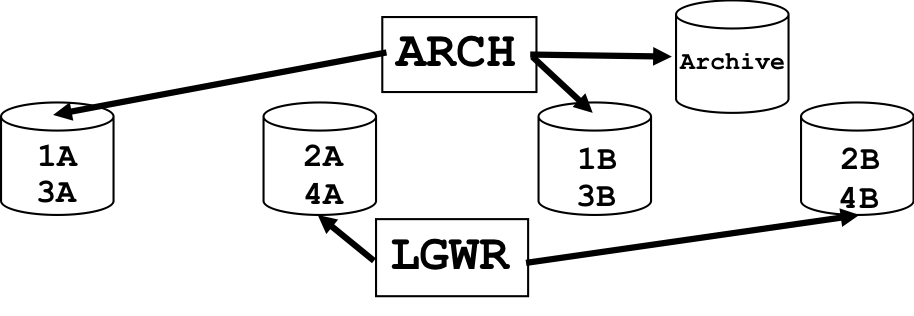
- Tuning I/O over redo log and archived redo log files
- Place all redo log files on one disk without any other database files
- Members of the same redo log group should be located on different persistent storage devices without any other database files
- Perform stripping of redo log files across many persistent storage devices
- If a persistent storage device contains archived redo logs then no other process should compete with archiver process for the access to the device
Tuning I/O
-
- Sizing redo log files
- Larger redo log size provide better performance
- Smaller redo log size increases checkpoint activity and decreases performance
- Checkpoint frequency depends on redo log file size and on parameter FAST_START_MTTR_TARGET which restricts instance recovery time
- Oracle tries to automatically perform checkpoint to limit amount of recovery time determined by the parameter
- Optimal size of redo log files is suggested in OPTIMAL_LOGFILE_SIZE column of V$INSTANCE_RECOVERY view
Performance Tuning of Relational Database Server
Outline
Choosing data block size
- To minimize a number of read operations
- A block size of 8K is considered to be the most universal solution
- If rows are small and access is random then choose a smaller block size
- If rows are small and access is sequential then choose a larger block size
- If rows are small and access is both random and sequential then choose a larger block size
- If rows are large and contain LOBs then choose a larger block size
- To minimize a number of write operations
- A block size of 8K is considered to be the most universal solution for OnLine Transaction Processing (OLTP) systems
- OnLine Analytical processing (OLAP) systems (Data Warehouses) benefit from large block size
Performance Tuning of Relational Database Server
Outline
Tuning operating system scheduling
- Principles
- Minimize amount of time spent on switching context (activating of a different thread of control)
- Choose operating system that has a lightweight thread switching facility
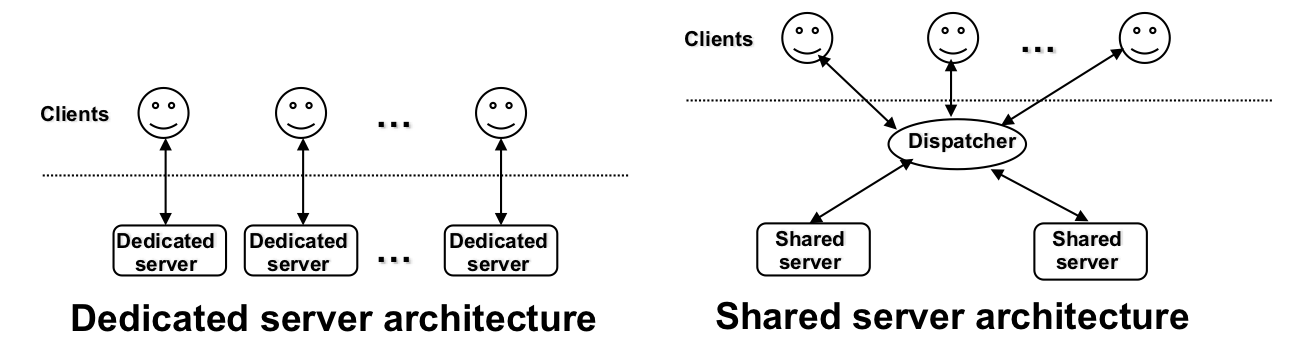
- Minimize a number of times context switching occurs (minimize I/O requests, time-slice driven interrupts)
References
- Oracle 19c Database Performance Tuning Guide, 2019
- T. Kyte, Expert Oracle Database Architecture, 9i, 10g, and 11g, APress, 2nd ed. 2011
- G. Harrison Oracle Performance Survival Guide, Prentice Hall, 2010
- D. Shasha and P.Bonnet Database Tuning Principles, Experiments, and Troubleshooting Techniques, Morgan Kaufmann, 2003, chapter 2, (UoW Library closed collection)