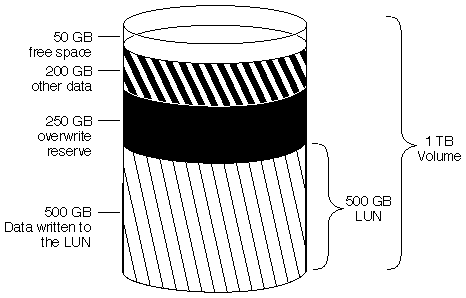
These examples demonstrate how setting space reservations and fractional reserve affects available space.
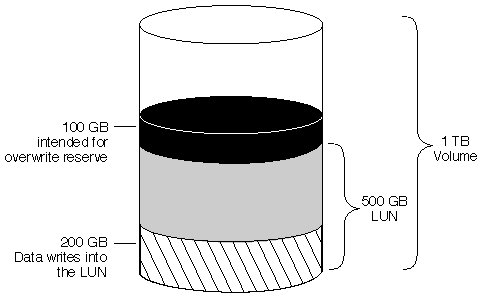
The following example shows how the default fractional reserve setting of 100 affects available space in a 1-TB volume with a 500-GB LUN.
The following illustration shows a 1-TB volume, with fractional reserve set to 100 percent, that contains a 500-GB space-reserved LUN. 200 GB of data was written to the LUN and a Snapshot copy was created of the volume.
Because the Snapshot copy was created, the 200 GB of data in the LUN are locked in the Snapshot copy, so the 200 GB of reserve space is needed to guarantee that you can write a full 500 GB of data to the LUN (which would require writing over the original 200 GB of data).
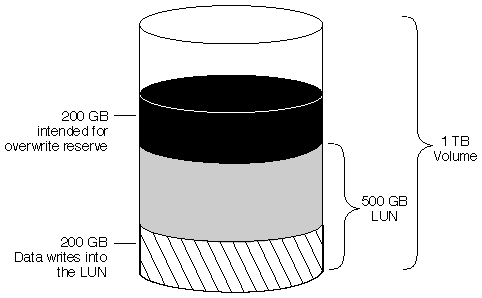
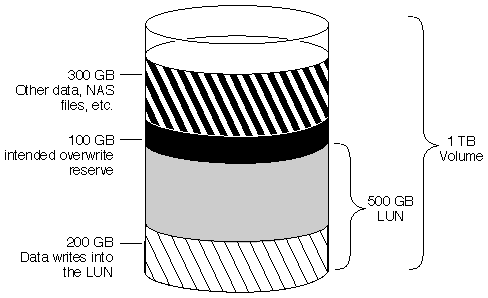
The following illustration shows a 1-TB volume, with fractional reserve set to 100 percent, that contains a 500-GB space-reserved LUN. 200 GB of data was written to the LUN and a Snapshot copy was created of the volume.
Because of the 200 GB of data that was written to the LUN, the volume has 200 GB reserved for overwrites to the original data. This leaves 300 GB of free space remaining for other data.

The following illustration shows the volume after you write 300 GB of other data (not in the LUN) to the volume. The volume reports that it is full because you have used all free space, but you can write data to the LUN indefinitely.

The following illustration shows the volume after you write another 100 GB of data to the LUN. The write succeeds, but the volume does not have enough space for another Snapshot copy. This is because the new Snapshot copy requires 300 GB of reserve space to account for the 300 GB of data contained by the LUN.

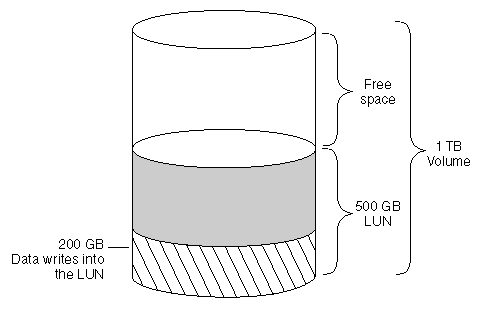
The following illustration shows the 1-TB volume with a 500-GB LUN that contains 200 GB of data. At this point, you have not taken a Snapshot copy, so no free space has been reserved and the volume has 500 GB of available space.
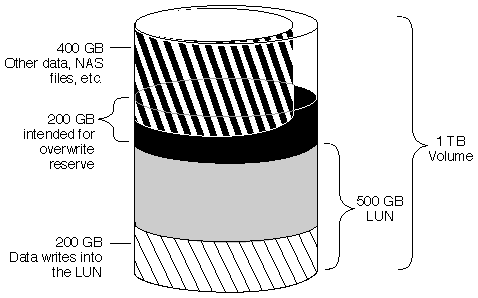
The following illustration shows the volume after you write 400 GB of other data. Data ONTAP reports that the volume is full when you try to take a Snapshot copy. This is because the 400 GB of other data does not leave enough space for the intended overwrite reserve. The Snapshot copy requires Data ONTAP to reserve 200 GB of space, but you have only 100 GB of available space.
The following example shows how a fractional reserve setting of 50 percent affects available space in the same 1-TB volume with a 500-GB LUN after a Snapshot copy is taken.
Compare this example with the volume shown in How writing data to the space-reserved LUN can affect available space, in which the same volume has an overwrite reserve of 100 percent, but the volume has run out of free space.
The following illustration shows a 1-TB volume with a 500-GB space-reserved LUN that has fraction reserve set to 50. You wrote 500 GB to the LUN and then you took a Snapshot copy. The volume has 250 GB reserved for overwrites to the LUN and 250 GB available for other data.
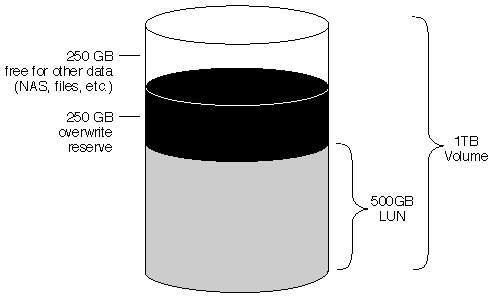
The following illustration shows that you have 50 GB of free space after you write 200 GB of other data (for example, files) to the volume. You try to write more than 300 GB of data to the LUN, and the write fails. The volume has 50 GB of free space plus 250 GB of space reserved for overwrites to the LUN. The volume has enough space for you to write no more than 300 GB of data to the LUN.