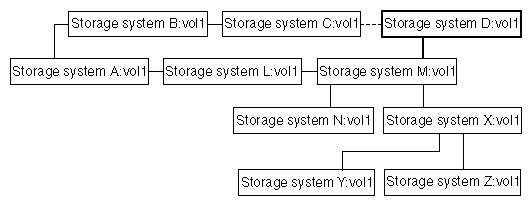
For example, in the cascade structure that follows, you might want to make systemD:vol1 a destination of systemM:vol1 instead of a destination of systemC:vol1.
Figure 1. Restructuring the relationship of the destinations in a cascade
Disconnecting a destination from a cascading series
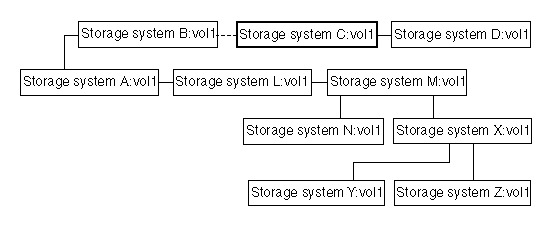
Figure 2. Disconnecting a destination in a cascade
For the configuration depicted in the preceding diagram, suppose that from systemB you enter the following command:snapmirror release vol1 systemC:vol1
These results follow.
- systemA:vol1 continues to be the source for the destination systemB:vol1.
- systemC:vol1 no longer copies from systemB:vol1. SnapMirror retains Snapshot copies for systemC and below.
- If systemC requests an update from systemB, the destination is reestablished if it is still not writable and the base Snapshot copy still exists on the source.
- systemD:vol1 still copies systemC:vol1.
- All the destinations that depend on systemL:vol1 continue functioning as before.
You can check that the destination was released by running the snapmirror destinations command on systemA, as follows.
systemA> snapmirror destinations -s systemA:vol1

Volume Snapshot                     Destination
vol1   systemB(0015269532)_vol1.37  systemB:vol1
vol1   systemL(0015269532)_vol1.42  systemL:vol1->systemM:vol1->systemXvol1->systemY:vol1
vol1   systemL(0015269532)_vol1.42  systemL:vol1->systemM:vol1->systemXvol1->systemZ:vol1
vol1   systemL(0015269532)_vol1.42  systemL:vol1->systemM:vol1->systemN:vol1
Note: If you want to permanently release a destination, you need to either delete the entry in the
/etc/snapmirror.conf file or comment out the entry by preceding it with a pound sign (#). Otherwise,
SnapMirror continues to try to update the destination.