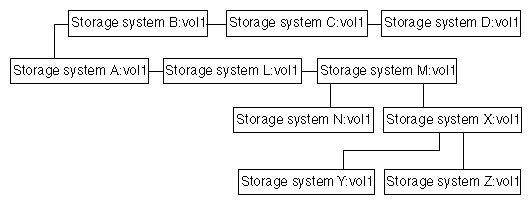
You can use the snapmirror destinations command to display the destinations for a volume in a cascading series.
The -s option generates a list of the names of the Snapshot copies retained for each destination.
volume_name is the name of the source volume for which you want to see the destinations.
Example
Suppose that you have used the snapmirror destinations command for a cascade configuration depicted in the following figure.
The output for the snapmirror destinations command for such a cascade configuration would be similar to the following output.systemA> snapmirror destinations vol1 Path Destination /vol/vol1 systemB:vol1->systemC:vol1->systemD:vol8 /vol/vol1 systemL:vol1->systemM:vol1->systemX:vol1->systemY:vol1 /vol/vol1 systemL:vol1->systemM:vol1->systemX:vol1->systemZ:vol1 /vol/vol1 systemL:vol1->systemM:vol1->systemN:vol1