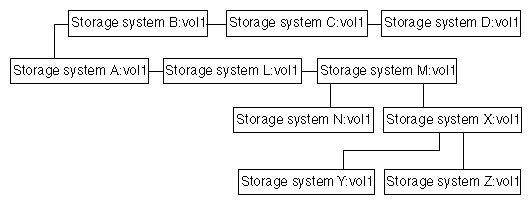
To support a series of cascading volume destinations as shown in the preceding diagram, the entries in the
file in each of the systems is the cascade should be similar to the following entries.
Note: When specifying the destination update schedule in the
snapmirror.conf file, stagger the update times instead of starting multiple destination updates at the same time. If
SnapMirror does not have enough resources to perform all scheduled destination updates, it postpones some updates. As a result,
SnapMirror might need to perform subsequent updates at times that are different from those you specify in the
snapmirror.conf file.