Structured Streaming
Outline
Programming Model
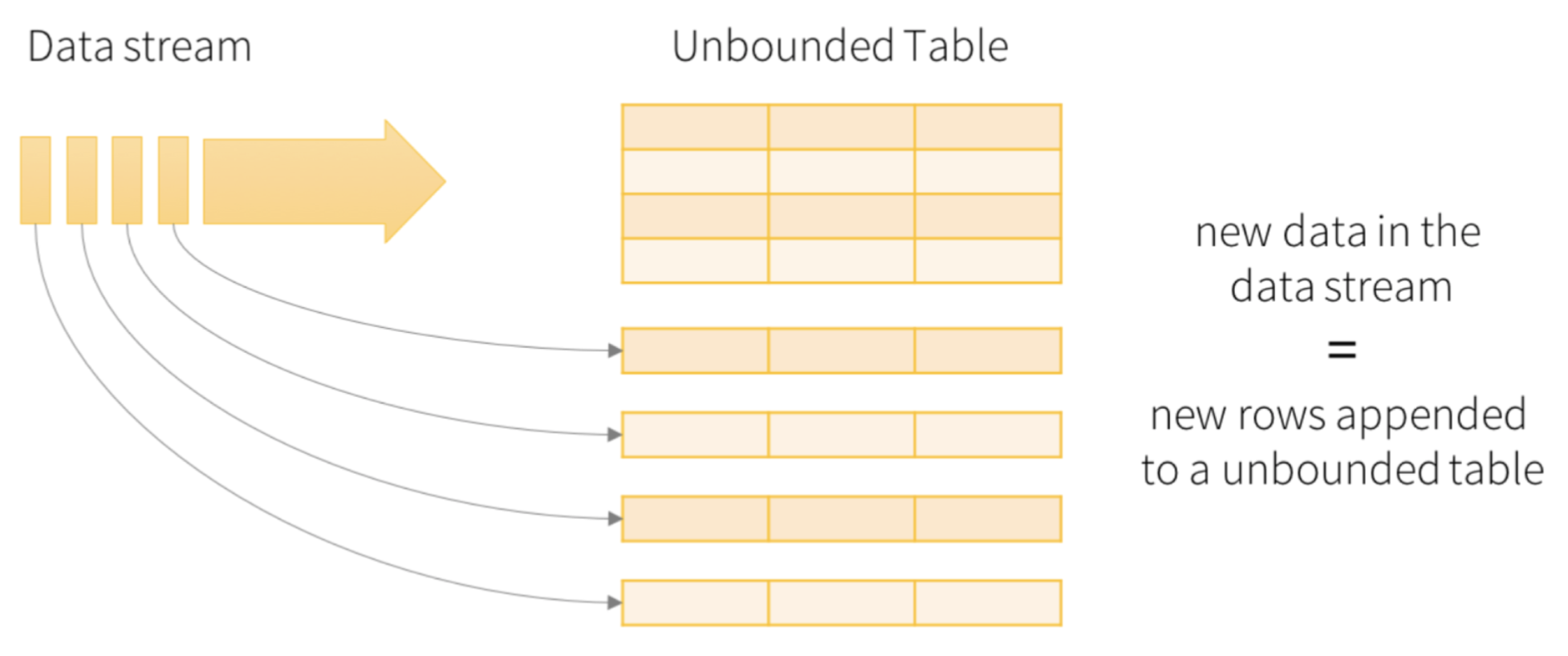
- The key idea in Structured Streaming is to treat a live data stream as a table that is being continuously appended
- This leads to a new stream processing model that is very similar to a batch processing model
- Users can express the streaming computation as standard batch-like query as on a static table, and Spark runs it as an incremental query on the unbounded Input Table
- A new data item arriving on the stream is like a new row being appended to Input Table
Programming Model
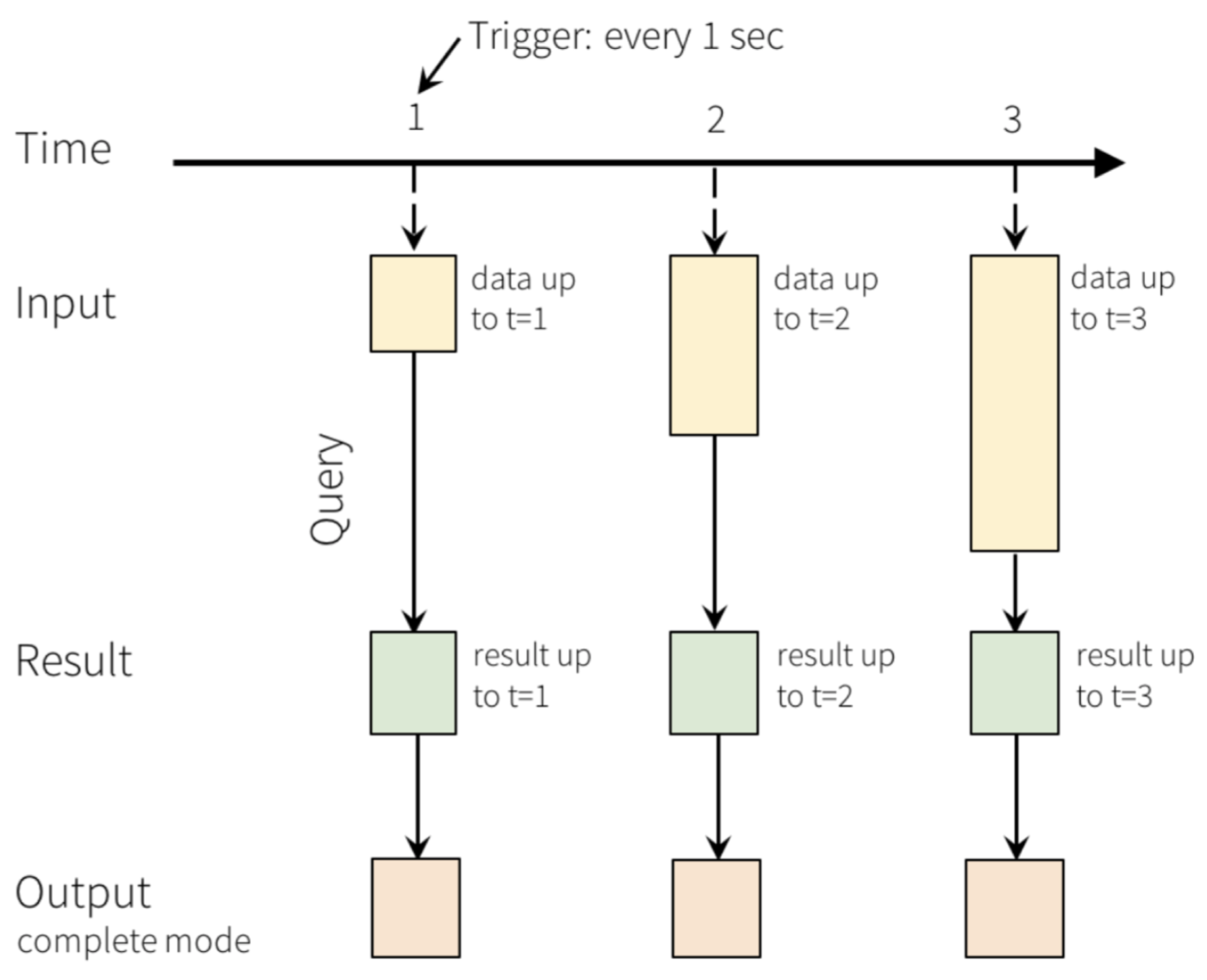
- A query on the input will generate Result Table
- Every trigger interval, let us say, every X seconds, the new rows get appended to Input Table
- It will eventually updates Result Table
- Whenever Result Table gets updated, we would want to write the changed result rows to an external sink
Programming Model
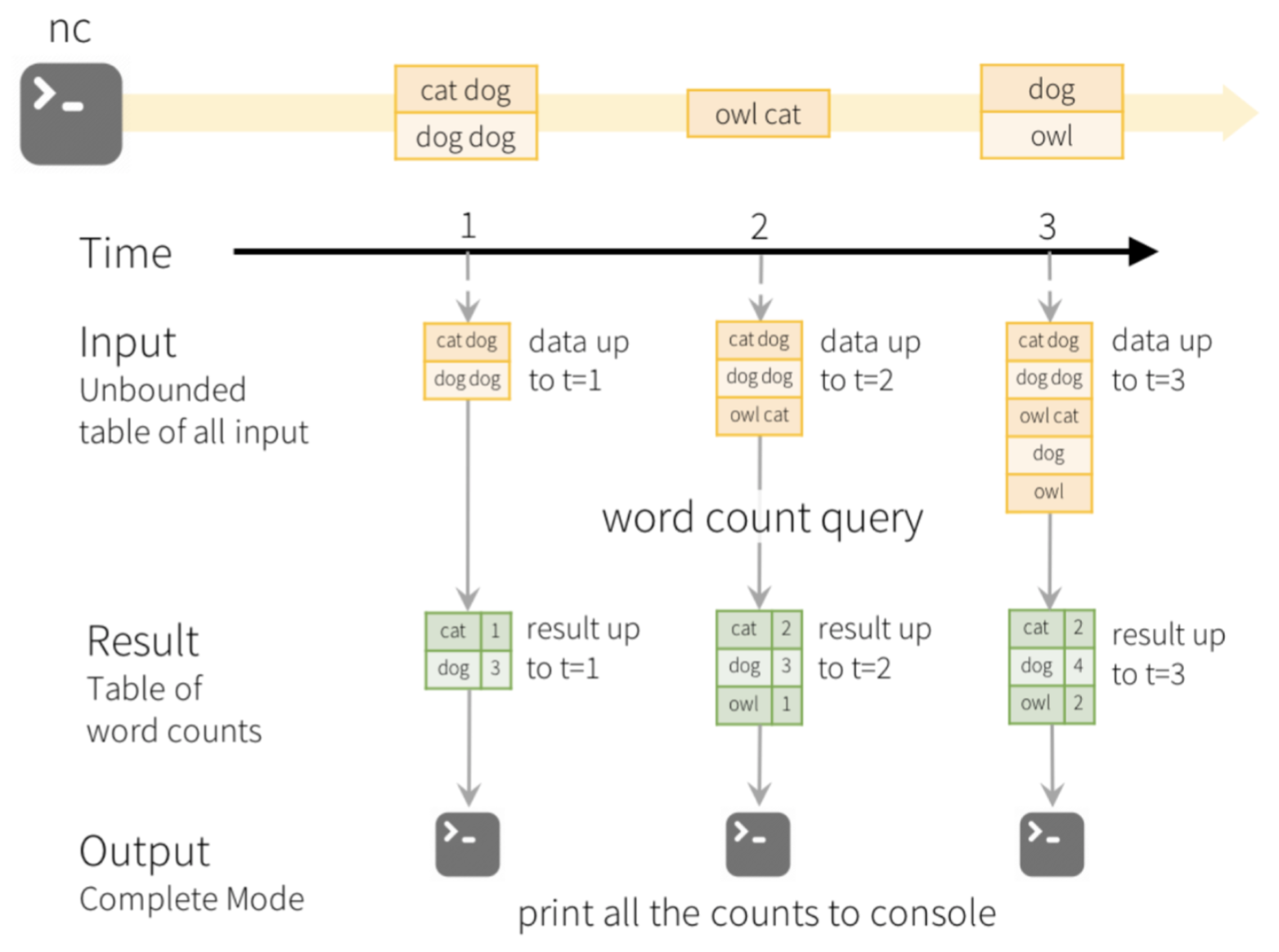
- A complete process
Structured Streaming
Outline
Input Source
- Structured Streaming is based on creating streaming DataFrames
- Streaming DataFrames can be created through the DataStreamReader interface returned by SparkSession.readStream()
- Structured Streaming may have the followign data sources
- File source: it reads files written in a directory as a stream of data
- Kafka source: it reads data from Kafka
- Socket source: it reads text data from a socket connection
- Rate source: it generates data at the specified number of rows per second, each output row contains a timestamp and value
- Rate Per Micro-Batch source: it generates data at the specified number of rows per micro-batch, each output row contains a timestamp and value
Structured Streaming
Outline
Starting Stream Queries
- To start the streaming computation we use Dataframe.writeStream() method
- One or more of the following details must be provided
- Details of the output sink: data format, location, etc.
- Output mode: what gets written to the output sink
- Query name: unique name of the query for identification (optional)
- Trigger interval: trigger interval (optional)
- Checkpoint location: location where the system will write all the checkpoint information (optional)
Structured Streaming
Outline
Output Modes
- Output from stream processing is what gets written out to the persistent storage
- Output can be one of the following modes
- Complete Mode: the entire updated Result Table is written to the external storage
- Append Mode: only the new rows appended to the Result Table since the last trigger activation are written to the external storage
- Update Mode: only the rows that were updated in the Result Table since the last trigger are written to the external storage
- Event-time is the time embedded in the data itself
- It is possible to operate on event-time, for example, to get the number of events generated by IoT devices every minute
- Each event from the devices is a row in the table, and event-time is a column value in the row
- Watermarking is used to specify the threshold of late data and it allows clean up old states
Structured Streaming
Outline
Output Sinks
- There are a few types of built-in output sinks
- File sink: stores the output to a directory
writeStream.format("parquet").option("path", "path/to/destination/dir").start()
	 // format can be "orc", "json", "csv", etc.
writeStream.format("kafka").option("kafka.bootstrap.servers", "host1:port1,host2:port2")
	                   .option("topic", "updates").start()
writeStream.foreach(...).start()
writeStream.format("console").start()
Output Sinks
- Memory sink: outputs the results memory as an in-memory table, supports Append and Complete output modes
writeStream.format("memory").queryName("tableName").start()
Structured Streaming
Outline
Sample Structured Stream Processing
- Assume that we want to count the number of words in text data received from a data server listening on a TCP socket
- Import SparkSession and string processing functions explode and split
from pyspark.sql import SparkSession
from pyspark.sql.functions import explode
from pyspark.sql.functions import split
spark = SparkSession.builder.appName("StructuredNetworkWordCount").getOrCreate()
lines = spark.readStream.format("socket").option("host", "localhost").option("port", 9999).load()
Sample Structured Stream Processing
- Split the lines into words
words = lines.select( explode( split(lines.value, " ") ).alias("word") )
wordCounts = words.groupBy("word").count()
query = wordCounts.writeStream.outputMode("complete").format("console").start()
query.awaitTermination()
Sample Structured Stream Processing
- The input is simulated by Netcat (a small utility found in most Unix-like systems) as a data server
nc -lk 9999
./bin/spark-submit examples/src/main/python/sql/streaming/structured_network_wordcount.py localhost 9999
abc def
abc def
Sample Structured Stream Processing
- Then we could see the following output in an application Terminal window
-------------------------------------------
Batch: 0
-------------------------------------------
+----+-----+
|word|count|
+----+-----+
+----+-----+
-------------------------------------------
Batch: 1
-------------------------------------------
+----+-----+
|word|count|
+----+-----+
| abc|    1|
| def|    1|
+----+-----+
------------------------------------------
Batch: 2
-------------------------------------------
+----+-----+
|word|count|
+----+-----+
| abc|    2|
| def|    2|
+----+-----+
Sample Structured Stream Processing
- Assume that instead of words we would like to count the numbers greater or equal 100 coming as an input stream of numbers
- Import SparkSession
from pyspark.sql import SparkSession
spark = SparkSession.builder.appName("StructuredNetworkWordCount").getOrCreate()
socketDF = spark.readStream.format("socket").option("host", "localhost").option("port", 9999).load()
numbers = socketDF.select(socketDF.value.cast("Int").alias("number"))
numbersge100= numbers.filter(numbers.number>=100)
Sample Structured Stream Processing
- Count the numbers greater or equal 100
numberCounts = numbersge100.groupBy("number").count()
query = numberCounts.writeStream.outputMode("complete").format("console").start()
Sample Structured Stream Processing
- Assume that we would like to process a stream of files inserted into a given folder
- Each file consists of lines with numbers
- Import SparkSession and StructType
from pyspark.sql import SparkSession
from pyspark.sql.functions import StructType
spark = SparkSession.builder.appName("StructuredNetworkWordCount").getOrCreate()
userSchema = StructType().add("number", "integer")
Sample Structured Stream Processing
- Create DataFrame csvDF representing a stream of csv files inserted into a folder /user/bigdata
csvDF = spark.readStream.schema(userSchema).csv("/user/bigdata")
numberCounts = csvDF.groupBy("number").count()
query = numberCounts.writeStream.outputMode("complete").format("console").start()
Structured Streaming
Outline
Operations on Streaming DataFrames
- Basic Operations - Selection, Projection, Aggregation
df = ...  # streaming DataFrame with IOT device data with schema
      	  { device: string, deviceType: string, signal: double, time: DateType }
df.select("device").where("signal > 10")
df.groupBy("deviceType").count()
df.createOrReplaceTempView("updates")
spark.sql("select count(*) from updates")
df.isStreaming()
Operations on Streaming DataFrames
- Assume that we would like to process a stream of files inserted into a given folder
- Each file consists of lines with names and grades separated with a comma
James,20
Alice,55
Harry,0
Charlie,99
from pyspark.sql import SparkSession
from pyspark.sql.functions import StructType
spark = SparkSession.builder.appName("StructuredNetworkWordCount").getOrCreate()
Operations on Streaming DataFrames
- Create userSchema
userSchema = StructType().add("name", "string").add("score", "integer")
gradesDF = spark.readStream.schema(userSchema).csv("/user/bigdata")
gradesDF.createOrReplaceTempView("grades")
sqlDF=spark.sql("select count(*), max(score), min(score), avg(score) from grades")
query = sqlDF.writeStream.outputMode("complete").format("console").start()
Operations on Streaming DataFrames
- Sample results
------------------------------------------
Batch: 0
-------------------------------------------
+--------+----------+----------+----------+
|count(1)|max(score)|min(score)|avg(score)|
+--------+----------+----------+----------+
|       2|        55|        20|      37.5|
+--------+----------+----------+----------+

-------------------------------------------
Batch: 1
-------------------------------------------
+--------+----------+----------+----------+
|count(1)|max(score)|min(score)|avg(score)|
+--------+----------+----------+----------+
|       4|        99|         0|      43.5|
+--------+----------+----------+----------+

-------------------------------------------
Batch: 2
-------------------------------------------
+--------+----------+----------+----------+
|count(1)|max(score)|min(score)|avg(score)|
+--------+----------+----------+----------+
|       6|        99|         0|      41.5|
+--------+----------+----------+----------+
Structured Streaming
Outline
Window Operations on Event Time
- In a simple grouped aggregation, aggregate values like for example counts, are maintained for each unique value in the user-specified grouping column
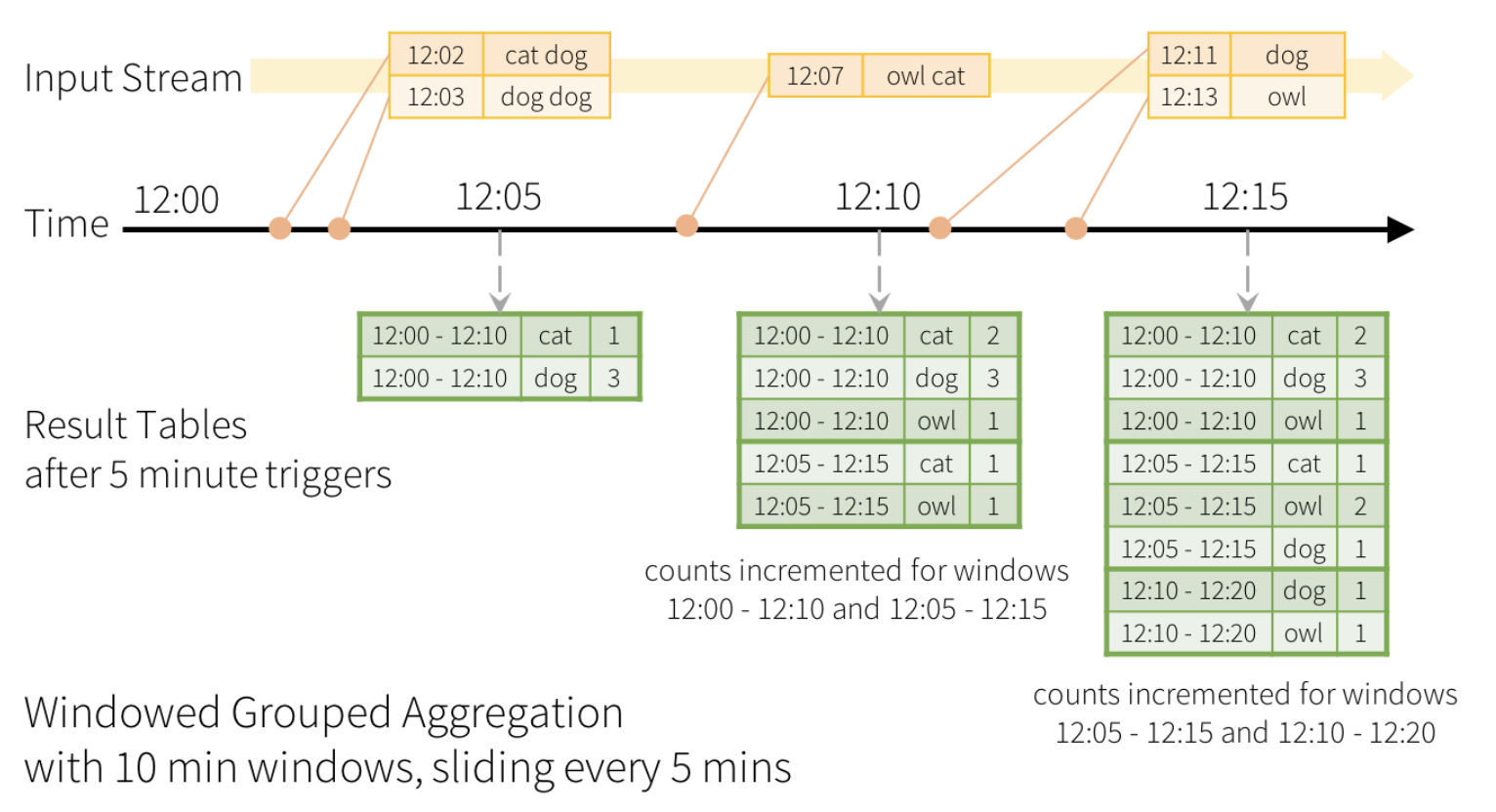
- In a case of window-based aggregations, aggregate values are maintained for each window the event-time of a row falls into
- For example we want to count words within 10 minute windows, updating every 5 minutes
Window Operations on Event Time
- In window-based aggregation it is possible to use groupBy() and window() operations
words = ... # streaming DataFrame of schema { timestamp: Timestamp, word: String }windowedCounts = words.groupBy(window(words.timestamp, "10 minutes", "5 minutes"), words.word).count()
Structured Streaming
Outline
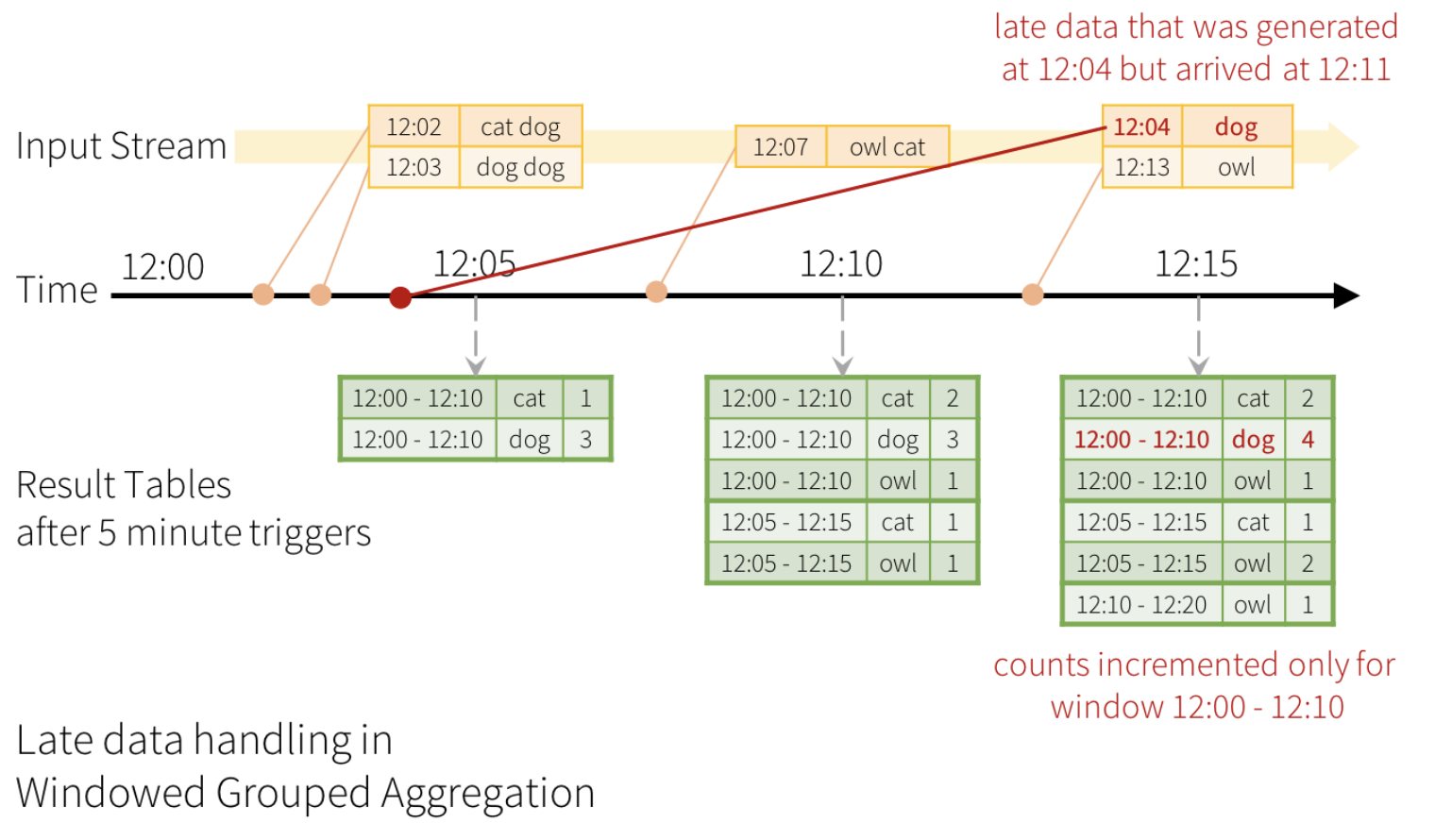
Handling Late Data
- What happens if one of the events arrives late to the application ?
- Late data can be used to update the past aggregations
Structured Streaming
Outline
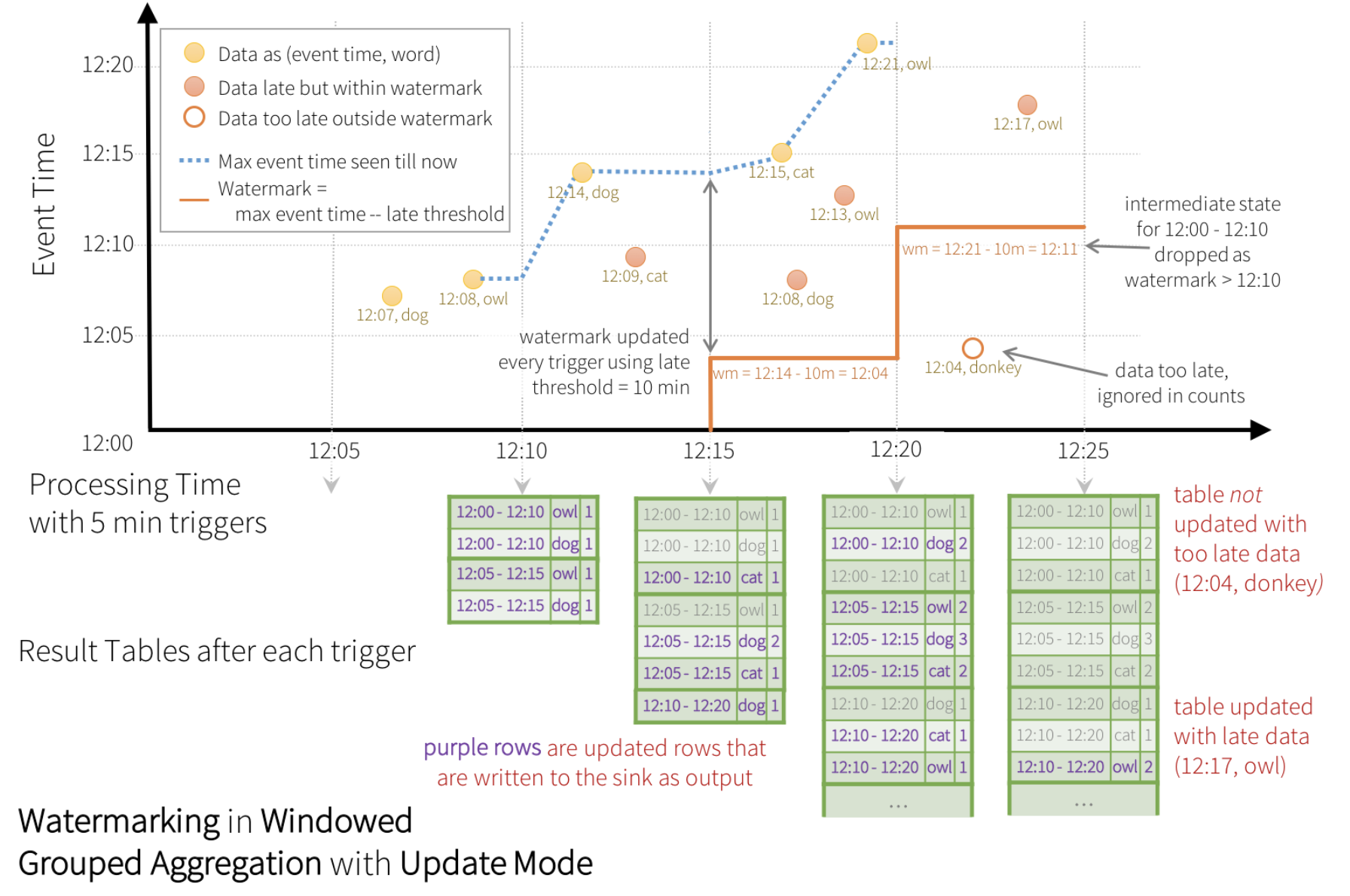
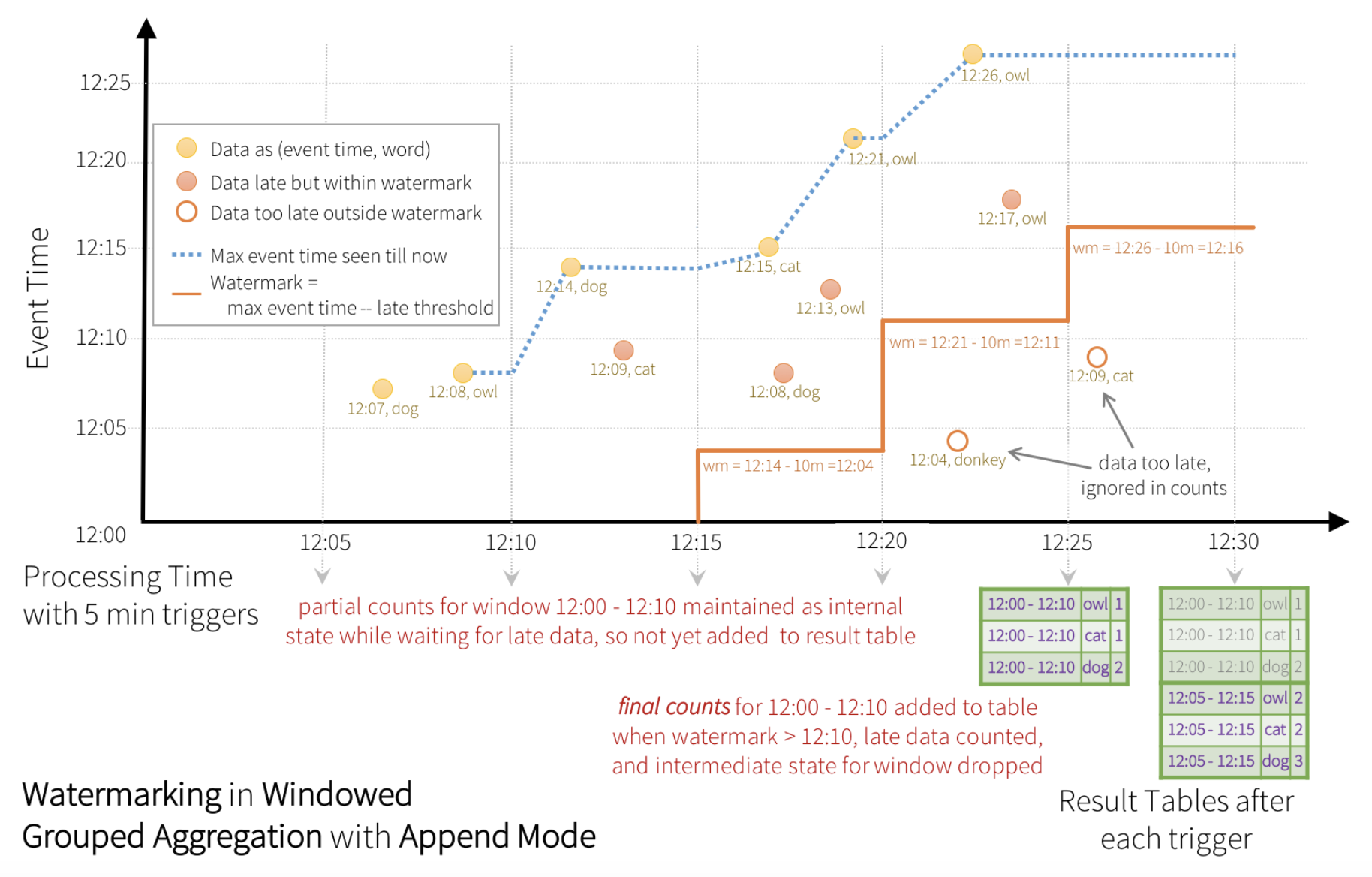
Watermarking
- Keeping old data for a very long time is not possible due to the transient memory limitations
- Watermarking allows to track the current event time in the data and attempt to clean up old aggregations
- A watermark of a query determines an event time column and the threshold on how late the data is expected to be in terms of event time
- For example, if a window ends at time T, the system maintains state and allow late data to update the state until (max event time seen by the engine - late threshold > T)
- Late data within the threshold are aggregated, but data later than the threshold are dropped
Watermarking
- In the example below the threshold of how late is the data allowed to be is set to 10 minutes
words = ... # streaming DataFrame of schema { timestamp: Timestamp, word: String }windowedCounts = words.withWatermark("timestamp", "10 minutes").groupBy( window(words.timestamp, "10 minutes", "5 minutes"), words.word).count()
Watermarking
- Update mode
Watermarking
- Append mode
Structured Streaming
Outline
Types of Time Window
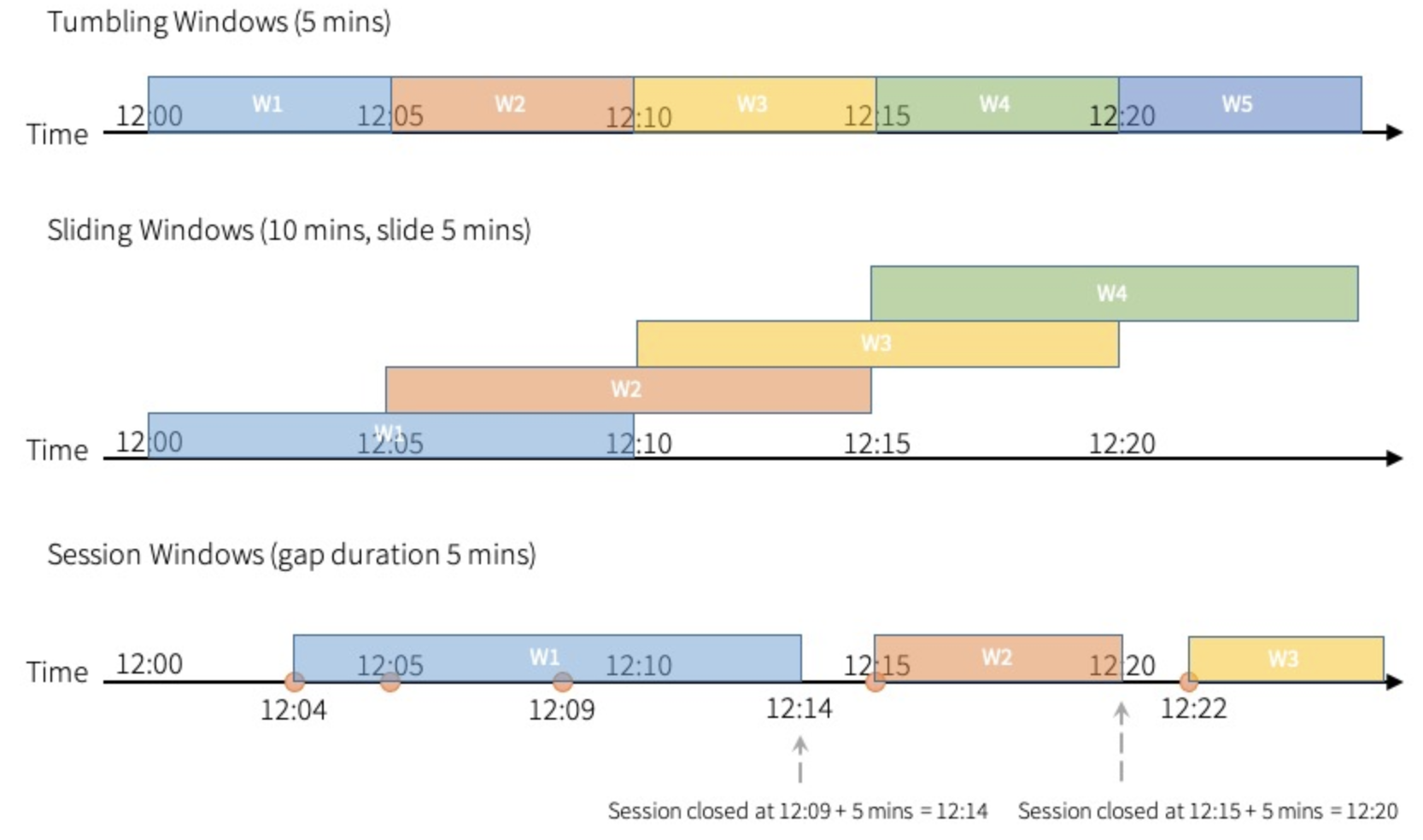
- Spark supports three types of time windows: tumbling (fixed), sliding and session
Types of Time Window
- Tumbling windows are a series of fixed-sized, non-overlapping and contiguous time intervals
- Sliding windows are “fixed-sized”, but windows can overlap if the duration of slide is smaller than the duration of window, and in this case an input can be bound to the multiple windows
- Tumbling and sliding window use window function
- Session windows have have a dynamic size of the window length, depending on the inputs
- A session window starts with an input, and expands itself if following input has been received within gap duration
- For static gap duration, a session window closes when there’s no input received within gap duration after receiving the latest input
Types of Time Window
- Session window uses session_window function
events = ... # streaming DataFrame of schema {timestamp: Timestamp, userId: String}sessionizedCounts = events.withWatermark("timestamp", "10 minutes").groupBy( session_window(events.timestamp, "5 minutes"), events.userId).count()
Types of Time Window
- A session window’s range is the union of all events’ ranges which are determined by event start time and evaluated gap duration during the query execution
from pyspark.sql import functions as sf
events = ... # streaming DataFrame of schema { timestamp: Timestamp, userId: String }session_window = session_window(events.timestamp, sf.when(events.userId == "user1", "5 seconds") .when(events.userId == "user2", "20 seconds") .otherwise("5 minutes"))sessionizedCounts = events \ .withWatermark("timestamp", "10 minutes") \ .groupBy( session_window, events.userId) \ .count()
References
- Structured Streaming Programming Guide
- Spark SQL, DataFrames and Datasets Guide
- Perrin J-G., Spark in Action, 2nd ed., Manning Publications Co. 2020