Advanced DDL and DML statements
Outline
TRUNCATE TABLE statement
- TRUNCATE TABLE statement permamenetly deletes all rows from a relational table
- TRUNCATE TABLE statement is a Data Definition Language (DDL) statement and because of that it cannot be reversed (in the future we shall learn how to reverse DML statements)
- TRUNCATE TABLE statement does not have WHERE clause and because of that it can only delete ALL rows from a relational table
- TRUNCATE TABLE statement deletes all rows much faster than DELETE statement because a database system does not need to save rollback information
- TRUNCATE TABLE statement returns unused persistent storage to a pool of free persistent storage while DELETE statement does not do that
TRUNCATE TABLE statement
- For example, delete all courses from a relational table COURSE
TRUNCATE TABLE COURSE;
Advanced DDL and DML statements
Outline
CREATE TABLE statement with subquery
- CREATE TABLE statement with subquery creates a relational table and saves in the table the results of a given SELECT statement
- CREATE TABLE statement with subquery is Data Definition Language (DDL) statement and its actions cannot be reversed
- A relational table created by CREATE TABLE statement with subquery does not have any consistency constraints enforced except NULL/NOT NULL constraint
- For example, a table, that contains the names of departments together with the total number of courses offered by each department can be created and correct data can be inserted into it in the following way
CREATE TABLE DCNT AS
( SELECT name, COUNT(cnum) totc
  FROM DEPARTMENT LEFT OUTER JOIN COURSE
                  ON DEPARTMENT.name = COURSE.offered_by
  GROUP BY name );
CREATE TABLE statement with subquery
- The names of columns in a new relational table are taken from the names of columns in SELECT clause or from alias names attached to the columns names or functions
- A relational table DCNT created and loaded with data has two columns: name and totc
- The consistency constraints can be enforced with ALTER TABLE statements
ALTER TABLE DCNT ADD CONSTRAINT DCNT_pkey PRIMARY KEY(name);
ALTER TABLE DCNT ADD CONSTRAINT DCNT_fkey FOREIGN KEY (name)
                                          REFERENCES DEPARTMENT(name);
Advanced DDL and DML statements
Outline
INSERT statement with subquery
- INSERT statement with subquery inserts into a relational table the rows retrived by a given SELECT statement
- INSERT statement with subquery is Data Manipluation Language (DML) statement an because of that its actions can be reversed with ROLLBACK statement
- For example, to enforce the consistency constraints first, we create a relational table DCNT with ordinary CREATE TABLE statement
CREATE TABLE DCNT(
 name          VARCHAR(50)  NOT NULL,
 total_courses DECIMAL(2)    NOT NULL,
  CONSTRAINT DCNT_pkey PRIMARY KEY(name),
  CONSTRAINT DCNT_fkey FOREIGN KEY (name) REFERENCES DEPARTMENT(name) );
INSERT statement with subquery
- And then we use INSERT statement with subquery to load data into a relational
table DCNT
INSERT INTO DCNT
( SELECT name, COUNT(cnum)
  FROM DEPARTMENT LEFT OUTER JOIN COURSE
                  ON DEPARTMENT.name = COURSE.offered_by
  GROUP BY name );
Advanced DDL and DML statements
Outline
DELETE statement with subquery
- DELETE statement with subquery deletes from a relational table all rows that satisfy WHERE condition
- WHERE condition includes a subquery
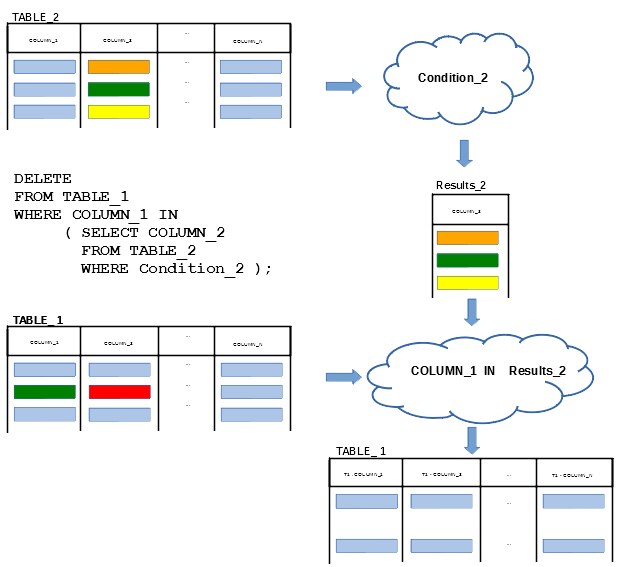
DELETE statement with subquery
- For example, we would like to delete all courses offered by a department chaired by Peter
DELETE FROM COURSE
WHERE offered_by = ( SELECT name
                     FROM DEPARTMENT
                     WHERE chair = 'Peter' );
DELETE FROM DEPARTMENT
WHERE NOT EXISTS ( SELECT 'whatever'
                   FROM COURSE
                   WHERE COURSE.offered_by = DEPARTMENT.name );
Advanced DDL and DML statements
Outline
UPDATE statement with subquery
- UPDATE statement with subquery updates in a relational table all rows that satisfy WHERE condition with the values determined in SET clause
- UPDATE statement with subquery can use a subquery in WHERE clause
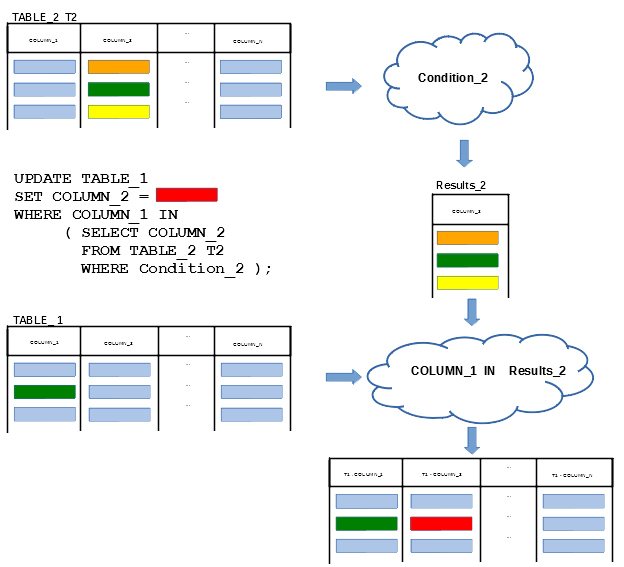
UPDATE statement with subquery
- UPDATE statement with subquery can use a subquery in SET clause or in both WHERE and SET clauses
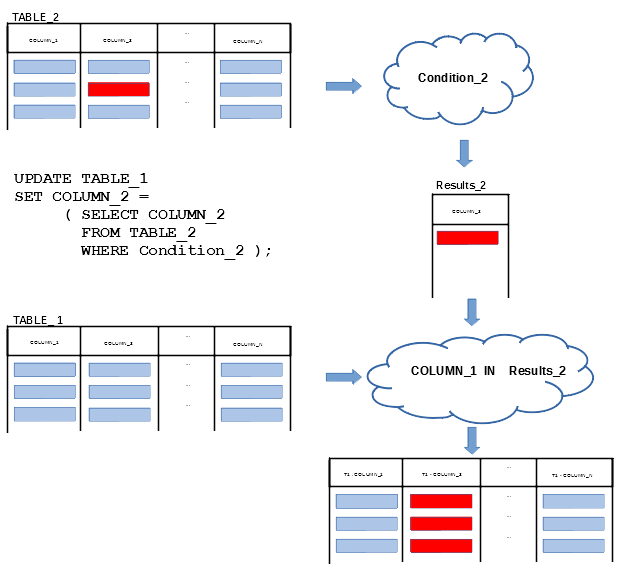
UPDATE statement with subquery
- For example, we would like to increase the total number of staff members by 5 in all departments that offer more than 20 courses
UPDATE DEPARTMENT
SET total_staff_number = total_staff_number + 5
WHERE name IN ( SELECT offered_by
                FROM COURSE
                GROUP BY offered_by
                HAVING COUNT(cnum) > 20 );
ALTER TABLE DEPARTMENT ADD ( total_courses DECIMAL(2) );
UPDATE DEPARTMENT
SET total_courses = ( SELECT COUNT(title)
                      FROM COURSE
                      WHERE COURSE.offered_by = DEPARTMENT.name );
References
- C. Coronel, S. Morris, A. Basta, M. Zgola, Data Management and Security, Chapters 5, 7, Cengage Compose eBook, 2018, eBook: Data Management and Security, 1st Edition
- How to ... ? Cookbook, Recipe 7.2 How to perform advanced data manipulations ?