Views
Outline
Inline views
- An inline view is SELECT statement enclosed within ( and ) brackets and followed by an optional inline view name
- A view name is a name of a temporary relational table created while SELECT statement is processed
- A temporary relational table is created only for a period of time when SELECT statement, that contains inline view is processed
- A name of inline view can be used within SELECT statement in any place where a name of a relational table can be used
Inline views
- Sample database
CREATE TABLE DEPARTMENT(
 name               VARCHAR(50)        NOT NULL,
 code               CHAR(5)            NOT NULL,
 total_staff_number DECIMAL(2)         NOT NULL,
 chair              VARCHAR(50)            NULL,
 budget             DECIMAL(9,1)       NOT NULL,
  CONSTRAINT dept_pkey PRIMARY KEY(name),
  CONSTRAINT dept_ckey1 UNIQUE(code),
  CONSTRAINT dept_ckey2 UNIQUE(chair),
  CONSTRAINT dept_check1 CHECK (total_staff_number BETWEEN 1 AND 50) );
CREATE TABLE COURSE(
 cnum               CHAR(7)           NOT NULL,
 title              VARCHAR(200)      NOT NULL,
 credits            DECIMAL(2)        NOT NULL,
 offered_by         VARCHAR(50)           NULL,
  CONSTRAINT course_pkey PRIMARY KEY(cnum),
  CONSTRAINT course_check1 CHECK (credits IN (6, 12)),
  CONSTRAINT course_fkey1 FOREIGN KEY(offered_by)
                        REFERENCES DEPARTMENT(name) ON DELETE CASCADE );
Inline views
- A query find the chair people of departments, that offer more than one course can be decomposed into the following queries
- Find the total number of courses offered by a department
( SELECT count(*)
  FROM COURSE
  WHERE COURSE.offered_by = ... )
SELECT DEPARTMENT.chair
FROM DEPARTMENT
WHERE ( SELECT count(*)
        FROM COURSE
        WHERE COURSE.offered_by = DEPARTMENT.name )  > 1;
Inline views
- A query find the chair people of departments, that offer more than one course and the total number of courses offered by each department can be decomposed into the following queries
- Find the names of departments, that offer more than one course and the total number of courses offered by each department
( SELECT offered_by, count(*) total
  FROM COURSE
  GROUP BY offered_by
  HAVING count(*) > 1 ) MORETHAN1
SELECT DEPARTMENT.chair, MORETHAN1.total
FROM DEPARTMENT JOIN ( SELECT offered_by, count(*) total
                       FROM COURSE
		       GROUP BY offered_by
		       HAVING count(*) > 1 ) MORETHAN1
                ON DEPARTMENT.name = MORETHAN1.offered_by;
Inline views
- A query find the chair people of departments, that offer more than one course and the total number of courses offered by each department can be decomposed into the following queries
- Find the total number of courses offered by a department
( SELECT count(*)
  FROM COURSE
  WHERE COURSE.offered_by = ... ) TOTALC
( SELECT chair, ( SELECT count(*)
                  FROM COURSE
         	  WHERE COURSE.offered_by = DEPARTMENT.name ) TOTALC
  FROM DEPARTMENT ) CHAIRTOTAL
Inline views
- Find the chair people of departments, that offer more than one course and the total number of courses offered by each department
SELECT chair, TOTALC
FROM ( SELECT chair, ( SELECT count(*)
                       FROM COURSE
                       WHERE COURSE.offered_by = DEPARTMENT.name ) TOTALC
       FROM DEPARTMENT ) CHAIRTOTAL
WHERE CHAIRTOTAL.TOTALC > 1;
Views
Outline
Queries with WITH clause
- Consider a query, that finds the names of all departments together with the total number of courses offered by each department, include the departments that offer no courses
- The query can be decomposed into the following two queries:
- find the names of departments and the numbers of courses offered by each department, and a query ...
- aggregate the results from the first query over the names of departments and count the total number of courses offered by each department
- The first query can be implemented as a query definition DEPT_COURSE within WITH clause
WITH DEPT_COURSE AS
                   ( SELECT name, cnum
                     FROM DEPARTMENT LEFT OUTER JOIN COURSE
                                     ON DEPARTMENT.name = COURSE.offered_by ),
Queries with WITH clause
- The second query can be implemented as a query definition DC_COUNT, that references a query definition DEPT_COURSE within WITH clause
WITH DEPT_COURSE AS
                   ( SELECT name, cnum
                     FROM DEPARTMENT LEFT OUTER JOIN COURSE
                                     ON DEPARTMENT.name = COURSE.offered_by ),
     DC_COUNT AS
                   ( SELECT name, COUNT(cnum) total_courses
                     FROM DEPT_COURSE
                     GROUP BY name )
Queries with WITH clause
- The final query is implemented as SELECT statement appended to a query definition DC_COUNT within WITH clause
WITH DEPT_COURSE AS
                   ( SELECT name, cnum
                     FROM DEPARTMENT LEFT OUTER JOIN COURSE
                                     ON DEPARTMENT.name = COURSE.offered_by ),
     DC_COUNT AS
                   ( SELECT name, COUNT(cnum) total_courses
                     FROM DEPT_COURSE
                     GROUP BY name )
    SELECT name
    FROM DC_COUNT);
Queries with WITH clause
- In another example, WITH clause is used to reduce the complexity of implementation of a query, that finds the chair people of departments, that offer both 6 and 12 credit point courses
- The query is decomposed into the following subqueries:
- Find the names of departments, that offer 6 credit point courses
- Find the names of departments, that offer 12 credit point courses
- Find the names of departments included in both results from the subqueries above
- Find the chair people of departments included in the previous subquery
- The first subquery is implemented as a query definition COURSE6CR within WITH clause
WITH COURSE6CR AS
                 ( SELECT offered_by
                   FROM COURSE
                   WHERE credits = 6 ),
Queries with WITH clause
- A subquery, that finds the names of departments, that offer 12 credit point courses is implemented as a query definition COURSE12CR and it is appended to WITH clause
WITH COURSE6CR AS
                 ( SELECT offered_by
                   FROM COURSE
                   WHERE credits = 6 ),
     COURSE12CR AS
                 ( SELECT offered_by
                   FROM COURSE
                   WHERE credits = 12 ),
Queries with WITH clause
- A subquery, that finds the names of departments that offer both 6 and 12 credit point courses is implemented as a query definition COURSE6_12CR and it is appended to WITH clause
WITH COURSE6CR AS
                 ( SELECT offered_by
                   FROM COURSE
                   WHERE credits = 6 ),
     COURSE12CR AS
                 ( SELECT offered_by
                   FROM COURSE
                   WHERE credits = 12 ),
     COURSE6_12CR AS
                 ( SELECT COURSE6CR.offered_by
                   FROM COURSE6CR JOIN COURSE12CR
                                  ON COURSE6CR.offered_by = COURSE12CR.offered_by ),
Queries with WITH clause
- A subquery, that finds the chair people of departments that offer both 6 and 12 credit point courses is implemented as a query definition CHAIR and it is appended to WITH clause
WITH COURSE6CR AS
                 ( SELECT offered_by
                   FROM COURSE
                   WHERE credits = 6 ),
     COURSE12CR AS
                 ( SELECT offered_by
                   FROM COURSE
                   WHERE credits = 12 ),
     COURSE6_12CR AS
                 ( SELECT COURSE6CR.offered_by
                   FROM COURSE6CR JOIN COURSE12CR
                                  ON COURSE6CR.offered_by = COURSE12CR.offered_by ),
     CHAIR AS
                 ( SELECT DEPARTMENT.chair
                   FROM COURSE6_12CR JOIN DEPARTMENT
                                     ON COURSE6_12CR.offered_by = DEPARTMENT.name )
Queries with WITH clause
- Finally a query, that finds the chair people of departments that offer both 6 and 12 credit point courses is implemented as SELECT statement and it is appended to WITH clause
WITH COURSE6CR AS
                 ( SELECT offered_by
                   FROM COURSE
                   WHERE credits = 6 ),
     COURSE12CR AS
                 ( SELECT offered_by
                   FROM COURSE
                   WHERE credits = 12 ),
     COURSE6_12CR AS
                 ( SELECT COURSE6CR.offered_by
                   FROM COURSE6CR JOIN COURSE12CR
                                  ON COURSE6CR.offered_by = COURSE12CR.offered_by ),
     CHAIR AS
                 ( SELECT DEPARTMENT.chair
                   FROM COURSE6_12CR JOIN DEPARTMENT
                                     ON COURSE6_12CR.offered_by = DEPARTMENT.name )
SELECT *
FROM CHAIR;
Views
Outline
Relational views
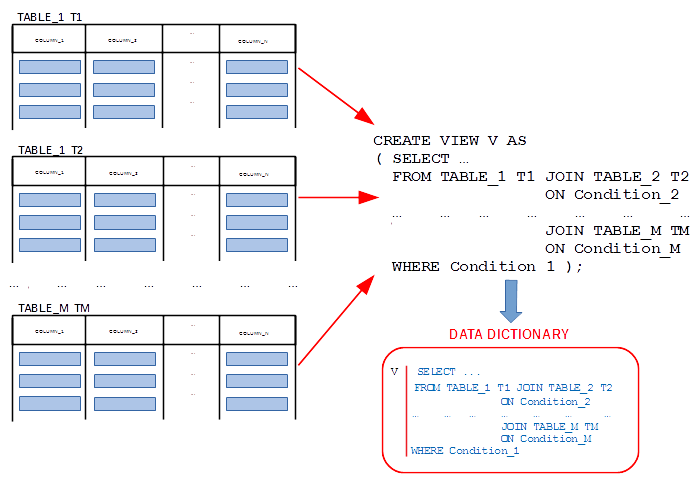
- A relational view is a virtual relational table (derived relational table), that occupies no persistent storage and it is computed from very beginning every time it is used in SELECT statement
- A relational view is stored by a database management system as a pair (name of a view, SELECT statement that defines the structure and contents of the view)
Relational views
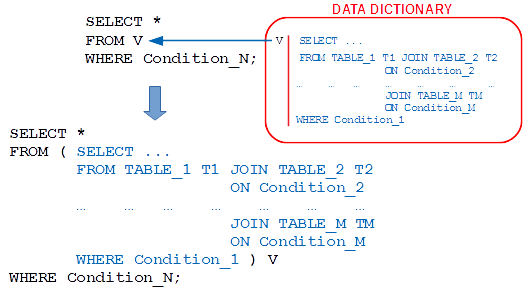
- Each time a name of a relational view is used in SELECT statement, its definition replaces the name of a view and it becomes an inline view
Relational views
- For example, create a relational view, that contains the names of all departments together with the total number of courses offered by each department
CREATE VIEW VDEPT( name, total_courses ) AS
( SELECT name, count(COURSE.cnum)
  FROM DEPARTMENT LEFT OUTER JOIN COURSE
                  ON DEPARTMENT.name = COURSE.offered_by
  GROUP BY DEPARTMENT.name );
Relational views
- Then, a view VDEPT can be used to implement a query, that finds the names of departments that offer more than 1 course
SELECT name
FROM VDEPT
WHERE total_courses > 1;
SELECT name, count(cnum)
FROM DEPARTMENT LEFT OUTER JOIN COURSE
                ON DEPARTMENT.name = COURSE.offered_by
GROUP BY name
HAVING count(cnum) > 1;
Relational views
- A relational view can be used to reduce the complexity of SELECT statements
- For example, a query, that finds the chair people of departments that offer both 6 and 12 credit point courses can be decomposed into the following four queries:
- V6: Find the names of departments, that offer 6 credit point courses
- V12: Find the names of departments, that offer 12 credit point courses
- VNAME: Find the names of departments included in both V6 and V12
- VCHAIR: Find the chair people of departments included in VNAME
Relational views
- The views are implemented in the following way
- V6: Find the names of departments that offer 6 credit point courses
CREATE VIEW V6( name ) AS
( SELECT offered_by
  FROM COURSE
  WHERE credits = 6 );
CREATE VIEW V12( name ) AS
( SELECT offered_by
  FROM COURSE
  WHERE credits = 12 );
CREATE VIEW VNAME( name ) AS
( SELECT V6.name
  FROM V6 JOIN V12
       ON V6.name = V12.name );
Relational views
- VCHAIR: Find the chairs of departments included in VNAME
CREATE VIEW VCHAIR( chair ) AS
( SELECT DEPARTMENT.chair
  FROM VNAME JOIN DEPARTMENT
	     ON VNAME.name = DEPARTMENT.NAME );
SELECT *
FROM VCHAIR;
References
- C. Coronel, S. Morris, A. Basta, M. Zgola, Data Management and Security, Chapters 5, 7, Cengage Compose eBook, 2018, eBook: Data Management and Security, 1st Edition
- T. Connoly, C. Begg, Database Systems, A Practical Approach to Design, Implementation, and Management, Chapter 7.4.1 Creating a View Pearson Education Ltd, 2015
- D. Darmawikarta, SQL for MySQL A Beginner’s Tutorial, Chapter 7 Subqueries, Chapter 9 Views, Brainy Software Inc. First Edition: June 2014
- How to ... ? Cookbook, How to implement relational views? (Part 2) Recipe 7.3 How to implement relational views ?