Replication
Outline
Basics
- Replication means automatic maintenance of data distributed over a number of MongoDB servers
- Replication is implemented as a mechanism called replica sets
- A replica sets is a group of nodes configured such that they can automatically synchronize their data and failover when a node disappears
- Older versions of MongoDB support a method of replication called master-slave (now considered as deprecated) that still can be used in MongoDB v3.0
- In both approaches, a single primary node receives all writes, and then all secondary nodes read and apply those writes to themselves asynchronously
- Replica sets use the same replication mechanism as master-slave with additionally ensuring automated failover
Basics
- In replica sets approach when a primary node goes offline then whenever it is possible one of the secondary nodes is automatically promoted to be a primary node
- Additionally, replica sets provide the improvements to the previous replication method like easier recovery and more sophisticated deployment topologies
- In a replica sets approach data is not considered as committed until it is written to a majority of member nodes, i.e. more than 50% of the servers
- It means that if a replica set has only two servers then no server can be down
- If the primary node in a replica sets fails before it replicates its data, other members will continue accepting writes, and any not replicated data must be rolled back, meaning it can no longer be read
Replication
Outline
Why replication ?
- Replication provides safety mechanisms protecting database system from environment failures like:
- a network connection between the application and the database is lost,
- there is a loss of power,
- persistent storage device (HDD, SSD) fails
- In addition to protecting against external failures, replication is important for system durability
- When running without backup/journaling the original values of corrupted data cannot be easily restored
- Replication can always guarantee a clean copy of the data files if a single node shuts down due to a hardware fault
- Replication also facilitates redundancy, failover, maintenance, and load balancing
- Replication is designed primarily for redundancy
Why replication ?
- It ensures that the contents of replicated nodes are synchronised with the primary node
- The replicas can be located in the same place as a primary node or at different location connected with a primary node over wide area network
- Replication is asynchronous and because of that any sort of network latency or partition between nodes have no impact on performance of the primary node
- The modifications of the contents of replicated nodes can be delayed by a constant number of seconds, minutes, or even hours behind the primary node
- It gives a chance to "move back in time" if the contents of the primary node is corrupted
- For example, if someone accidentally drops a wrong collection of objects and a replica is "delayed in time then it is possible to restore from a replica node
Why replication ?
- A delayed replica gives an administrator time to react and restore data
- Another application of replication is failover. It happens when a primary node fails and one of the redundant nodes takes a role of a primary node
- In MongoDB such "switch" is performed automatically.
- Replication simplifies maintenance by allowing the high workload operations to be done on a node other than the primary at production time
- For example, it is possible to run backups on a secondary node to avoid unnecessary additional load on the primary node and to avoid downtime
- Replication allows for building large indexes on a secondary node simultaneously with the operations on the primary node
Why replication ?
- Then it is possible to swap the secondary node with the existing primary and then build the same index again on the new secondary
- Replication allows to balance read operations across many replicas
- Data can be simultaneously read from many separate replicas; it is the easiest (and a bit simplistic) way to scale up the system
Replication
Outline
Why no-replication ?
- Replication does not improve performance a lot when:
- hardware can’t process the given workload; if performance becomes constrained by the number of I/O operations per second (IOPS) persistent storage can handle then reading from a replica increases total IOPS; if writes are occurring at the same time then it consumes all IOPS ( sharding is a better option)
- the ratio of writes to reads exceeds 50%; then every write to the primary must eventually be written to all the secondary nodes as well and directing the additional reads to secondary nodes slows down replication
- an application requires consistent reads; then secondary nodes replicate asynchronously and therefore they are not guaranteed to reflect the latest writes to the primary node
Replication
Outline
Experiment
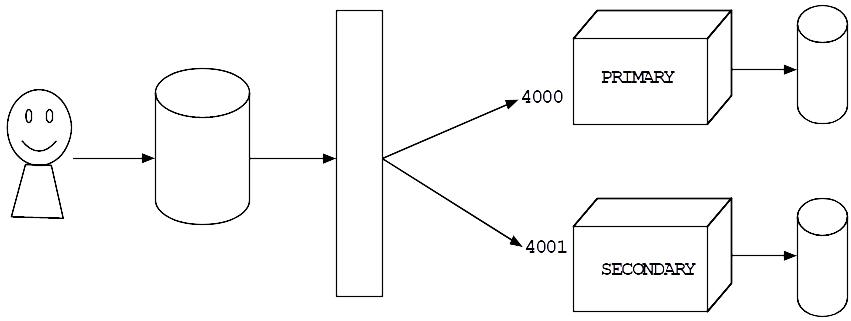
- We use replica sets to create two replica nodes simulated by two Mongo processes at the ports 4000 and 4001
Experiment
- Start Terminal and process the following shell commands
cd ~
mkdir node0
mkdir node1
mongod --dbpath node0 --port 4000 --replSet "rs0"
mongod --dbpath node1 --port 4001 --replSet "rs0"
Experiment
- Minimize Terminal window (do not close it !)
- Start Terminal and then start mongo client and connect to a server listening at a port 4000
mongo --port 4000
rs.initiate()
rs.conf()
rs.add("localhost:4001")
Experiment
- Check status
rs.status()
mongo --port 4001
rs.slaveOk()
Experiment
- Now, to test replication set we shall create a new collection and we shall insert a new document at mongo server at a port 4000; replication mechanism supposed to copy insertion to mongod server at a port 4001
- Return to a window where mongo client is connected to mongod server at a port 4000 and process
the following commands
use mydb
db.names.insert({"full-name":"James Bond"})
db.names.find()
use mydb
db.names.find()
Experiment
- An attempt to insert a new document by a client connected to mongod server at a port 4001 fails due to slave mode of the server
- To shutdown both replication servers execute in both windows the following statements
use admin
db.shutdownServer()
mongod --dbpath node0 --port 4000 --replSet "rs0"
Experiment
- Minimize Terminal window (do not close it !)
- Open another Terminal window and start mongod server with data located in node1 listening to a port 4001 and attached to the same replica set
mongod --dbpath node1 --port 4001 --replSet "rs0"
mongo --port 4001
rs.slaveOk()
Experiment
- Start Terminal and then start mongo client and connect to a server listening at a port 4000
mongo --port 4000
use mydb
db.names.insert({"full-name":"Harry Potter"})
db.names.find()
use mydb
db.names.find()
Replication
Outline
How does replication work ?
- Replica sets rely on two basic mechanisms: an oplog and a heartbeat
- Oplog (operation log) is a space restricted collection that lives in a database called local on every replica node and records all changes to the data
- Every time a client writes to the primary node, an entry with enough information to reproduce the write is automatically added to the primary node's oplog.
- Once the write is replicated to a given secondary node then its oplog also stores a record of the write
- When a given secondary node is ready to update itself, it performs the following actions:
- first, it looks at the timestamp of the latest entry in its own oplog
- next, it queries the primary node's oplog for all entries greater than that timestamp
- finally, it writes the data and adds each of those entries to its own oplog
How does replication work ?
- Then in a case of failover, any secondary promoted to primary will have an oplog that the other secondaries can replicate from; it enables replica set recovery
- Secondary nodes use long polling to immediately apply new entries from the primary’s oplog
- Long polling means the secondary makes a long-lived request to the primary
- When the primary receives a modification, it responds to the waiting request immediately
- The secondary nodes will usually be almost completely up to date
- If the secondary nodes fall behind because of network partitions or maintenance on secondaries, the latest timestamp in each secondary’s oplog can be used to monitor any replication lag
- The replica set heartbeat facilitates election and failover
How does replication work ?
- By default, each replica set member pings all the other members every two seconds
- As long as every node remains healthy and responsive, the replica set continue its work
- Every replica set wants to ensure that exactly one primary node exists at all times
- With no majority, the primary demotes itself to a secondary
- If the heartbeats fail due to some kind of network partition, the other nodes will still be online
- If the arbiter and secondary are still up and able to see each other, then according to the rule of the majority, the remaining secondary will become a primary
Replication
Outline
Commit and rollback
- Writes are not considered as committed until they are replicated to a majority of nodes
- Operations on a single document are always atomic and operations that involve multiple documents are not atomic
- Consider the following scenario:
- a series of writes to the primary node did not get replicated to the secondary node,
- primary node goes offline and the secondary is promoted to primary and new writes go to primary
- old primary comes back online as secondary and tries to replicate from the new primary
- old primary has a series of writes that don’t exist in the new primary node oplog
- It triggers a rollback
- Rollback reverses all writes that were never replicated to a majority of nodes
Commit and rollback
- The writes are removed from both the secondary’s oplog and the collection where they reside
- If a secondary node has registered a deleted document, the node will look for the deleted document in another replica and restore it to itself
- The same is true for dropped collections and updated documents
- The reverted writes are stored in the rollback subdirectory of the path in the relevant node
- For each collection with rolled-back writes, a separate BSON file will be created the filename of which includes the time of the rollback
- In the event that you need to restore the reverted documents, you can examine these BSON files using the bsondump utility and manually restore them, possibly using mongorestore
References
- Banker K., Bakkum P., Verch S., Garret D., Hawkins T., MongoDB in Action, 2nd ed., Manning Publishers, 2016
- MongoDB Manual, Replication