SQL for Data Warehousing

Outline

SQL/OLAP Operations

  • Consider the SALES fact table
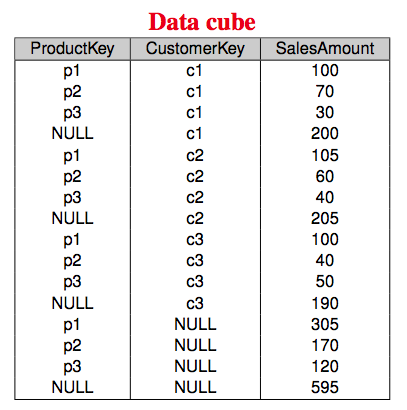
  • To compute all possible aggregations along the dimensions Product and Customer we must scan the whole relational table SALES several times
  • It can be implemented in SQL using NULL and UNION in the following way:
      	      
      SELECT ProductKey, CustomerKey, SalesAmount
      FROM Sales
        UNION
      SELECT ProductKey, NULL, SUM(SalesAmount)
      FROM Sales
      GROUP BY ProductKey
        UNION
      SELECT NULL, CustomerKey, SUM(SalesAmount)
      FROM Sales
      GROUP BY CustomerKey
        UNION
      SELECT NULL, NULL, SUM(SalesAmount)
      FROM Sales;
In HTML view press 'p' to see the lecture notes
TOP              Created by Janusz R. Getta, ISIT312/ISIT912 Big Data Management, Spring, 2026

SQL/OLAP Operations

  • A data cube created through UNION of individual SELECT statements each one creating one combination of dimensions looks in the following way
  • Relational Model

In HTML view press 'p' to see the lecture notes
TOP              Created by Janusz R. Getta, ISIT312/ISIT912 Big Data Management, Spring, 2026

SQL/OLAP Operations

  • Computing a cube with n dimensions requires (2*2*2*... *2)(n times) SELECT statements with GROUP BY clause
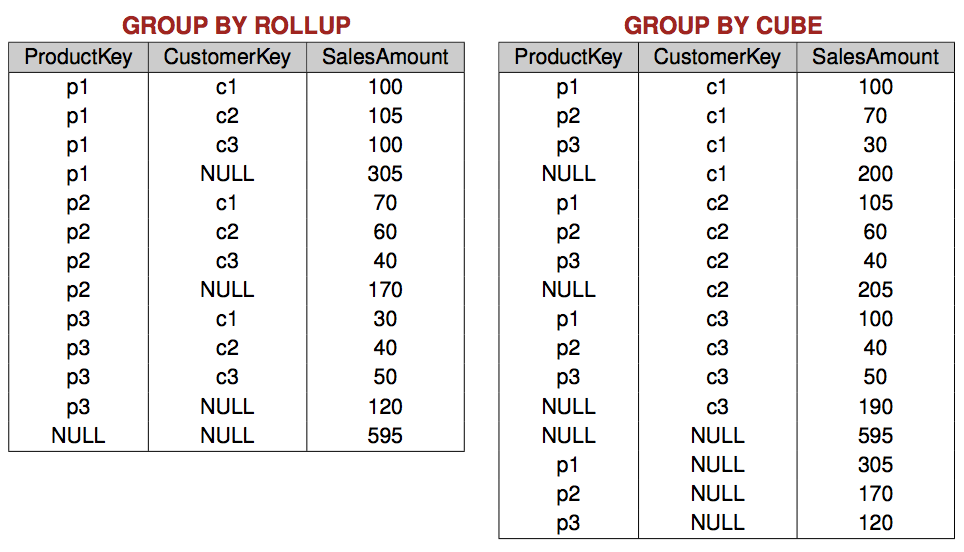
  • SQL/OLAP extends the GROUP BY clause with the ROLLUP and CUBE operators
  • ROLLUP computes group subtotals in the order given by a list of attributes
  • CUBE computes all totals of such a list
  • Shorthands for a more powerful operator, GROUPING SETS
  • Equivalent queries
      	      
      SELECT ProductKey, CustomerKey, SUM(SalesAmount)
      FROM Sales
      GROUP BY ROLLUP(ProductKey, CustomerKey);
      	      
      SELECT ProductKey, CustomerKey, SUM(SalesAmount)
      FROM Sales
      GROUP BY GROUPING SETS((ProductKey,CustomerKey),(ProductKey),());
In HTML view press 'p' to see the lecture notes
TOP              Created by Janusz R. Getta, ISIT312/ISIT912 Big Data Management, Spring, 2026

SQL/OLAP Operations

  • Equivalent queries
      
      SELECT ProductKey, CustomerKey, SUM(SalesAmount)
      FROM Sales
      GROUP BY CUBE(ProductKey, CustomerKey);
      
      SELECT ProductKey, CustomerKey, SUM(SalesAmount)
      FROM Sales
      GROUP BY GROUPING SETS((ProductKey, CustomerKey),(ProductKey),(CustomerKey),());
In HTML view press 'p' to see the lecture notes
TOP              Created by Janusz R. Getta, ISIT312/ISIT912 Big Data Management, Spring, 2026

SQL/OLAP Operations

    Operations

In HTML view press 'p' to see the lecture notes
TOP              Created by Janusz R. Getta, ISIT312/ISIT912 Big Data Management, Spring, 2026

SQL for Data Warehousing

Outline

Window partitioning

  • Allows to compare detailed data with aggregate values
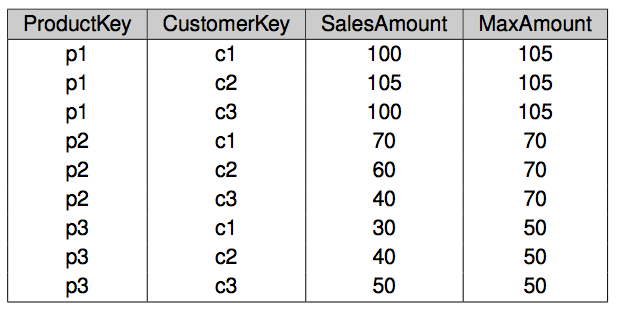
  • For example, find a relevance of each customer with respect to the sales of the product
      		    
      SELECT ProductKey, CustomerKey, SalesAmount,
             MAX(SalesAmount) OVER (PARTITION BY ProductKey) AS MaxAmount
      FROM SALES;
  • First three columns are obtained from the Sales table
  • The fourth column is created in the following way
    • Create a window called partition that contains all tuples of the same product
    • SalesAmount is aggregated over this window using MAX function
In HTML view press 'p' to see the lecture notes
TOP              Created by Janusz R. Getta, ISIT312/ISIT912 Big Data Management, Spring, 2026

Window partitioning

    • 	      
      SELECT ProductKey, CustomerKey, SalesAmount,
             MAX(SalesAmount) OVER (PARTITION BY ProductKey) AS MaxAmount
      FROM SALES;
  • Window partitioning

In HTML view press 'p' to see the lecture notes
TOP              Created by Janusz R. Getta, ISIT312/ISIT912 Big Data Management, Spring, 2026

SQL for Data Warehousing

Outline

Window ordering

  • ORDER BY clause allows the rows within a partition to be ordered
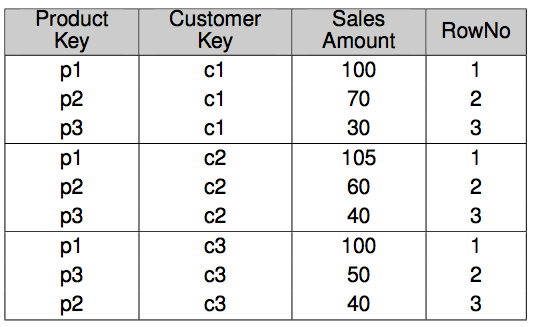
  • It is useful to compute rankings, with a function RANK()
  • For example, how does each product rank in the sales of each customer
      	      
      SELECT ProductKey, CustomerKey, SalesAmount,
             RANK() OVER (PARTITION BY CustomerKey ORDER BY SalesAmount DESC) AS RowNo
      FROM Sales;
  • Window Framing

In HTML view press 'p' to see the lecture notes
TOP              Created by Janusz R. Getta, ISIT312/ISIT912 Big Data Management, Spring, 2026

SQL for Data Warehousing

Outline

Window framing

  • It is possible to define a size of a partition
  • It can be used to compute statistical functions over time series, like moving average
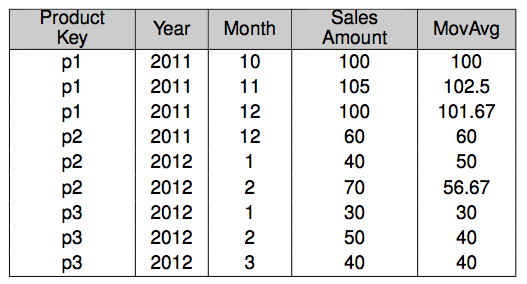
  • For example, three-month moving average of sales by product
      	      
      SELECT ProductKey, Year, Month, SalesAmount,
             AVG(SalesAmount) OVER (PARTITION BY ProductKey
                                    ORDER BY Year, Month
                                    ROWS 2 PRECEDING) AS MovAvg
      FROM SALES;
  • Processing of a query opens a window with the rows pertaining to the current product
  • Then, it orders the window by year and month and computes the average over the current row and the previous two ones if they exist
In HTML view press 'p' to see the lecture notes
TOP              Created by Janusz R. Getta, ISIT312/ISIT912 Big Data Management, Spring, 2026

Window framing

    • 	      
      SELECT ProductKey, Year, Month, SalesAmount,
             AVG(SalesAmount) OVER (PARTITION BY ProductKey
                                    ORDER BY Year, Month
                                    ROWS 2 PRECEDING) AS MovAvg
      FROM SALES;
  • Window framing

In HTML view press 'p' to see the lecture notes
TOP              Created by Janusz R. Getta, ISIT312/ISIT912 Big Data Management, Spring, 2026

Window framing

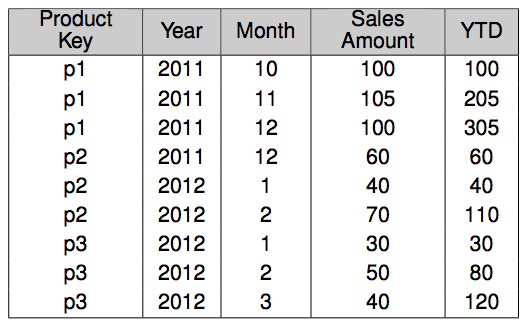
  • Another example, a year-to-date sum of sales by product
      	      
      SELECT ProductKey, Year, Month, SalesAmount,
             SUM(SalesAmount) OVER (PARTITION BY ProductKey, Year
                                    ORDER BY Month
                                    ROWS UNBOUNDED PRECEDING) AS YTD
      FROM SALES;
  • Processing of a query, opens a window with the tuples of the current product and year ordered by month
  • AVG() is applied to all rows before the current row (ROWS UNBOUNDED PRECEDING )
In HTML view press 'p' to see the lecture notes
TOP              Created by Janusz R. Getta, ISIT312/ISIT912 Big Data Management, Spring, 2026

Window framing

    • 	      
      SELECT ProductKey, Year, Month, SalesAmount,
             SUM(SalesAmount) OVER (PARTITION BY ProductKey, Year
                                    ORDER BY Month
                                    ROWS UNBOUNDED PRECEDING) AS YTD
      FROM SALES;
  • Window framing

In HTML view press 'p' to see the lecture notes
TOP              Created by Janusz R. Getta, ISIT312/ISIT912 Big Data Management, Spring, 2026

References

  • A. VAISMAN, E. ZIMANYI, Data Warehouse Systems: Design and Implementation, Chapter 5 Logical Data Warehouse Design, Springer Verlag, 2014
TOP              Created by Janusz R. Getta, ISIT312/ISIT912 Big Data Management, Spring, 2026