SQL - Data Definition Statements
Outline
CREATE TABLE statement
- CREATE TABLE statement creates a new relational table with a given name, given attribute names and types and with the given logical consistency constraints
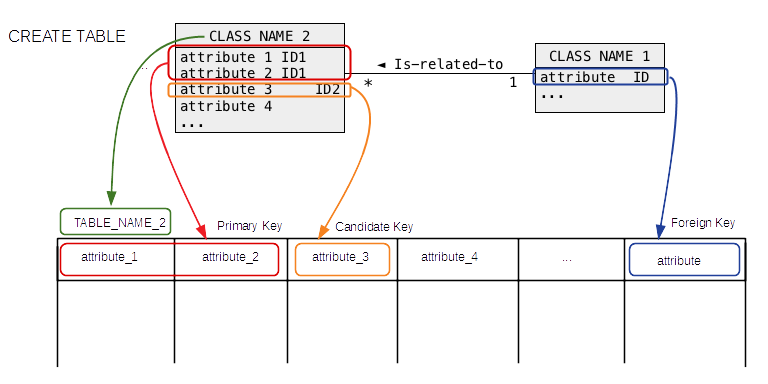
CREATE TABLE statement
- Example:
DEPARTMENT
name | code | total staff | chair | budget
- name: primary key, variable size string, no more than 50 characters, mandatory
- code: candidate key, fixed size string, precisely 5 characters
- total staff: total staff number, integer, range 1..50, mandatory
- chair: chaiperson, variable size string, no more than 50 characters, optional
- budget: real number, no more than 9 digits, one position after decimal dot, mandatory
CREATE TABLE statement
- Example:
CREATE TABLE DEPARTMENT(
name VARCHAR(50) NOT NULL,
code CHAR(5) NOT NULL,
total_staff_number DECIMAL(2) NOT NULL,
chair VARCHAR(50) NULL,
budget DECIMAL(9,1) NOT NULL,
CONSTRAINT dept_pkey PRIMARY KEY(name),
CONSTRAINT dept_ckey1 UNIQUE(code),
CONSTRAINT dept_ckey2 UNIQUE(chair),
CONSTRAINT dept_check1
CHECK (total_staff_number BETWEEN 1 AND 50) );
CREATE TABLE statement
- Table name
CREATE TABLE DEPARTMENT(
name               VARCHAR(50)        NOT NULL,
code               CHAR(5)            NOT NULL,
total_staff_number DECIMAL(2)         NOT NULL,
chair              VARCHAR(50)            NULL,
budget             DECIMAL(9,1)       NOT NULL,
name               VARCHAR(50)        NOT NULL,
code               CHAR(5)            NOT NULL,
total_staff_number DECIMAL(2)         NOT NULL,
chair              VARCHAR(50)            NULL,
budget             DECIMAL(9,1)       NOT NULL,
CREATE TABLE statement
- NULL/NOT NULL constraints
name               VARCHAR(50)        NOT NULL,
code               CHAR(5)            NOT NULL,
total_staff_number DECIMAL(2)         NOT NULL,
chair              VARCHAR(50)            NULL,
budget             DECIMAL(9,1)       NOT NULL,
- Primary key constraint
CONSTRAINT dept_pkey PRIMARY KEY(name),
- Candidate key constraints
CONSTRAINT dept_ckey1 UNIQUE(code),
CONSTRAINT dept_ckey2 UNIQUE(chair),
- Domain constraint
CONSTRAINT dept_check1 CHECK (total_staff_number BETWEEN 1 AND 50) );
CREATE TABLE statement
- "Bird's eye view"
CREATE TABLE DEPARTMENT(
 name               VARCHAR(50)        NOT NULL,
 code               CHAR(5)            NOT NULL,
 total_staff_number DECIMAL(2)         NOT NULL,
 chair              VARCHAR(50)            NULL,
 budget             DECIMAL(9,1)       NOT NULL,
  CONSTRAINT dept_pkey PRIMARY KEY(name),
  CONSTRAINT dept_ckey1 UNIQUE(code),
  CONSTRAINT dept_ckey2 UNIQUE(chair),
  CONSTRAINT dept_check1 CHECK (total_staff_number BETWEEN 1 AND 50) );
CREATE TABLE statement
- Another example
COURSE
cnum | title | credits | offered_by
- cnum: primary key, fixed size string, 7 characters
- title: candidate key, variable size string no longer than 100 characters, is mandatory
- credits: integer, either 6 or 12, is mandatory
- offered_by: foreign key, references department name, variable size string, no longer than 50 characters, is optional
CREATE TABLE statement
- Another example
CREATE TABLE COURSE(
cnum CHAR(7) NOT NULL,
title VARCHAR(200) NOT NULL,
credits DECIMAL(2) NOT NULL,
offered_by VARCHAR(50) NULL,
CONSTRAINT course_pkey PRIMARY KEY(cnum),
CONSTRAINT course_check1 CHECK (credits IN (6, 12)),
CONSTRAINT course_fkey1 FOREIGN KEY(offered_by)
                        REFERENCES DEPARTMENT(name)ON DELETE CASCADE );
CREATE TABLE statement
- Table name
CREATE TABLE COURSE(
cnum               CHAR(7)           NOT NULL,
title              VARCHAR(200)      NOT NULL,
credits            DECIMAL(2)        NOT NULL,
offered_by         VARCHAR(50)           NULL,
cnum               CHAR(7)           NOT NULL,
title              VARCHAR(200)      NOT NULL,
credits            DECIMAL(2)        NOT NULL,
offered_by         VARCHAR(50)           NULL,
CREATE TABLE statement
- NULL/NOT NULL constraints
cnum               CHAR(7)           NOT NULL,
title              VARCHAR(200)      NOT NULL,
credits            DECIMAL(2)        NOT NULL,
offered_by         VARCHAR(50)           NULL,
- Primary key constraint
CONSTRAINT course_pkey PRIMARY KEY(cnum),
- Domain constraint
CONSTRAINT course_check1 CHECK (credits IN (6, 12)),
- Foreign key constraint
CONSTRAINT course_fkey1 FOREIGN KEY(offered_by)
                        REFERENCES DEPARTMENT(name) ON DELETE CASCADE );
CREATE TABLE statement
- "Bird's eye view"
CREATE TABLE COURSE(
 cnum               CHAR(7)           NOT NULL,
 title              VARCHAR(200)      NOT NULL,
 credits            DECIMAL(2)        NOT NULL,
 offered_by         VARCHAR(50)           NULL,
  CONSTRAINT course_pkey PRIMARY KEY(cnum),
  CONSTRAINT course_check1 CHECK (credits IN (6, 12)),
  CONSTRAINT course_fkey1 FOREIGN KEY(offered_by)
                          REFERENCES DEPARTMENT(name) ON DELETE CASCADE );
CREATE TABLE statement
- Some of the attribute types:
- VARCHAR(size) Variable length string, maximum size 65535 bytes
- CHAR(size) Fixed length string, maximum size 255 bytes
- INTEGER Integer numbers in a range [-2147483648, 2147483647]
- REAL(M,D) Real numbers with total M digits and D digits after decimal point
- DECIMAL(M) Integer numbers with total M digits stored with exact precision
- DECIMAL(M,D) Real numbers with total M digits and D digits after decimal point stored with exact precision
- DATE dates, default entry format 'YYYY-MM-DD'
- TIME times, default entry format 'HH:MI:SS;
- DATETIME dates and times, default entry format 'YYYY-MM-DD HH:MI:SS'
SQL - Data Definition Statements
Outline
DROP TABLE statement
- Functionality:
- DROP TABLE statement permanently deletes the contents of relational table and removes its definition from a database
- A relational table that has been dropped can be recreated as an empty table by the execution of CREATE TABLE statement
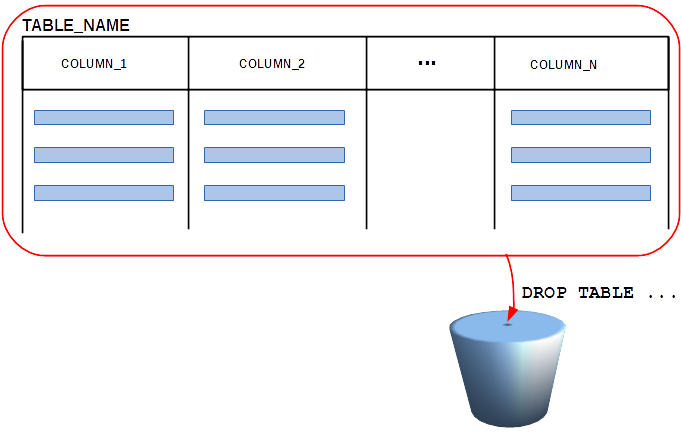
DROP TABLE statement
- Examples:
CREATE TABLE DEPARTMENT(
 name               VARCHAR(50)        NOT NULL,
 code               CHAR(5)            NOT NULL,
 total_staff_number DECIMAL(2)         NOT NULL,
 chair              VARCHAR(50)            NULL,
 budget             DECIMAL(9,1)       NOT NULL,
  CONSTRAINT dept_pkey PRIMARY KEY(name),
  CONSTRAINT dept_ckey1 UNIQUE(code),
  CONSTRAINT dept_ckey2 UNIQUE(chair),
  CONSTRAINT dept_check1 CHECK (total_staff_number BETWEEN 1 AND 50) );
CREATE TABLE COURSE(
 cnum               CHAR(7)           NOT NULL,
 title              VARCHAR(200)      NOT NULL,
 credits            DECIMAL(2)        NOT NULL,
 offered_by         VARCHAR(50)           NULL,
  CONSTRAINT course_pkey PRIMARY KEY(cnum),
  CONSTRAINT course_check1 CHECK (credits IN (6, 12)),
  CONSTRAINT course_fkey1 FOREIGN KEY(offered_by)
                        REFERENCES DEPARTMENT(name) ON DELETE CASCADE )
DROP TABLE statement
- Examples:
DROP TABLE COURSE;
DROP TABLE DEPARTMENT;
DROP TABLE DEPARTMENT;
--------------
DROP TABLE DEPARTMENT
--------------

ERROR 1217 (23000): Cannot delete or update a parent row: a foreign key
constraint fails
SQL - Data Definition Statements
Outline
ALTER TABLE statement
- Functionality
- ALTER TABLE statement permanently changes a definition of relational table
- ALTER TABLE statement can be used to:
- add or drop a column,
- modify a type of column,
- add or drop a consistency constraint,
- rename a relational table
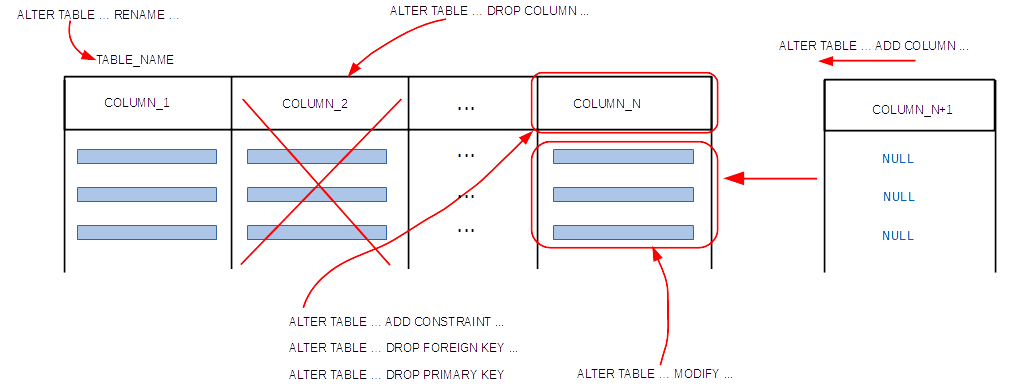
ALTER TABLE statement
- Adding the attributes
CREATE TABLE DEPARTMENT(
 name               VARCHAR(50)        NOT NULL,
 code               CHAR(5)            NOT NULL,
 total_staff_number DECIMAL(2)         NOT NULL,
 chair              VARCHAR(50)            NULL,
 budget             DECIMAL(9,1)       NOT NULL,
  CONSTRAINT dept_pkey PRIMARY KEY(name),
  CONSTRAINT dept_ckey1 UNIQUE(code),
  CONSTRAINT dept_ckey2 UNIQUE(chair),
  CONSTRAINT dept_check1 CHECK (total_staff_number BETWEEN 1 AND 50) );
ALTER TABLE DEPARTMENT ADD COLUMN category VARCHAR(20);
ALTER TABLE DEPARTMENT ADD COLUMN vision_stmt VARCHAR(5000);
ALTER TABLE statement
- Dropping an attribute
CREATE TABLE DEPARTMENT(
 name               VARCHAR(50)        NOT NULL,
 code               CHAR(5)            NOT NULL,
 total_staff_number DECIMAL(2)         NOT NULL,
 chair              VARCHAR(50)            NULL,
 budget             DECIMAL(9,1)       NOT NULL,
  CONSTRAINT dept_pkey PRIMARY KEY(name),
  CONSTRAINT dept_ckey1 UNIQUE(code),
  CONSTRAINT dept_ckey2 UNIQUE(chair),
  CONSTRAINT dept_check1 CHECK (total_staff_number BETWEEN 1 AND 50) );
ALTER TABLE DEPARTMENT DROP COLUMN budget;
ALTER TABLE statement
- Changing a type of attribute
CREATE TABLE DEPARTMENT(
 name               VARCHAR(50)        NOT NULL,
 code               CHAR(5)            NOT NULL,
 total_staff_number DECIMAL(2)         NOT NULL,
 chair              VARCHAR(50)            NULL,
 budget             DECIMAL(9,1)       NOT NULL,
  CONSTRAINT dept_pkey PRIMARY KEY(name),
  CONSTRAINT dept_ckey1 UNIQUE(code),
  CONSTRAINT dept_ckey2 UNIQUE(chair),
  CONSTRAINT dept_check1 CHECK (total_staff_number BETWEEN 1 AND 50) );
ALTER TABLE DEPARTMENT MODIFY code CHAR(6) NOT NULL;
ALTER TABLE DEPARTMENT MODIFY chair VARCHAR(80) NOT NULL;
ALTER TABLE statement
- Adding a constraint
CREATE TABLE DEPARTMENT(
 name               VARCHAR(50)        NOT NULL,
 code               CHAR(5)            NOT NULL,
 total_staff_number DECIMAL(2)         NOT NULL,
 chair              VARCHAR(50)            NULL,
 budget             DECIMAL(9,1)       NOT NULL,
  CONSTRAINT dept_pkey PRIMARY KEY(name),
  CONSTRAINT dept_ckey1 UNIQUE(code),
  CONSTRAINT dept_ckey2 UNIQUE(chair),
  CONSTRAINT dept_check1 CHECK (total_staff_number BETWEEN 1 AND 50) );
ALTER TABLE DEPARTMENT ADD CONSTRAINT dept_check2
                       CHECK (code = UPPER(code));
ALTER TABLE statement
- Dropping a constraint
CREATE TABLE COURSE(
 cnum               CHAR(7)           NOT NULL,
 title              VARCHAR(200)      NOT NULL,
 credits            DECIMAL(2)        NOT NULL,
 offered_by         VARCHAR(50)           NULL,
  CONSTRAINT course_pkey PRIMARY KEY(cnum),
  CONSTRAINT course_check1 CHECK (credits IN (6, 12)),
  CONSTRAINT course_fkey1 FOREIGN KEY(offered_by)
                        REFERENCES DEPARTMENT(name) ON DELETE CASCADE );
ALTER TABLE COURSE DROP FOREIGN KEY course_fkey1;
ALTER TABLE DEPARTMENT DROP PRIMARY KEY;
ALTER TABLE COURSE DROP CHECK COURSE_CHECK1;
ALTER TABLE statement
- Renaming a relational table
CREATE TABLE DEPARTMENT(
 name               VARCHAR(50)        NOT NULL,
 code               CHAR(5)            NOT NULL,
 total_staff_number DECIMAL(2)         NOT NULL,
 chair              VARCHAR(50)            NULL,
 budget             DECIMAL(9,1)       NOT NULL,
  CONSTRAINT dept_pkey PRIMARY KEY(name),
  CONSTRAINT dept_ckey1 UNIQUE(code),
  CONSTRAINT dept_ckey2 UNIQUE(chair),
  CONSTRAINT dept_check1 CHECK (total_staff_number BETWEEN 1 AND 50) );
ALTER TABLE DEPARTMENT RENAME TO NEWDEPARTMENT;
References
- C. Coronel, S. Morris, A. Basta, M. Zgola, Data Management and Security, Chapter 5 Introduction to Structured Query Language, Cengage Compose eBook, 2018, eBook: Data Management and Security, 1st Edition
- T. Connoly, C. Begg, Database Systems, A Practical Approach to Design, Implementation, and Management, Chapters 7.1, 7.2, 7.3 (except 7.3.5, 7.3.6) SQL: Data Definition, Pearson Education Ltd, 2015
- D. Darmawikarta, SQL for MySQL A Beginner’s Tutorial, Chapter 1, pages 5-8, Brainy Software Inc. First Edition: June 2014
- How to ... ? Cookbook, How to use data definition and basic data manipulation statements of SQL ? Recipe 4.1 How to create and how to alter the relational tables ?