Architecture of Relational Database Server
Outline
Client-Server Architecture
- A client-server architecture means, that a number of clients connects to a database server over a local or wide-area network
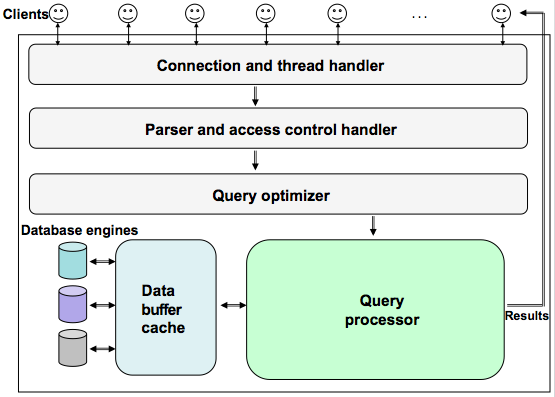
Client-Server Architecture
- A database server is implemented over there layers:
- Services not unique to MySQL like: network based client/server tools for connection handling, authentication, security, etc
- DDL and DML processing like query processing, analysis, optimization, caching, and all built-in functions, data entry, data modification, creating database structures, etc
- Database (storage) engines responsible for storing and retrieving data, e.g. InnoDB, MyISAM, MEMORY, CSV, etc
Client-Server Architecture
- Client connections are organized in the following way:
- As more than one client can be connected at a time, each client connection gets its own thread within a database server
- A thread resides on one core or on one CPU
- When a client connects to a server then a server authenticates a connection
- Authentication is based on a user name, originating host and password
- Once a client is connected, the server verifies whether it has the privileges to access the relational tables in a database
Architecture of Relational Database Server
Outline
Basic Operations on Database Server
- Starting/stopping a database server
- Usually a database server is automatically started at boot-up time of an operating system
- A database server can be stopped through a command line interface to an operating system (shell) for a certain period of time
service mysql stop
service mysql start
service mysql status
Architecture of Relational Database Server
Outline
Initialization Variables
- At startup time a database server reads the system initialization variables
- The system initialization variables determine the functionality of a database server
- For example, see below some of the system initalization variables of MySQL database server
+-------------------------------+--------------------------+
| Variable_name                 | Value                    |
+-------------------------------+--------------------------+
| auto_increment_increment      | 1                        |
| auto_increment_offset         | 1                        |
| autocommit                    | ON                       |
| automatic_sp_privileges       | ON                       |
| avoid_temporal_upgrade                                   |
...          ...               ...          ...           ...
| datadir                       | /var/lib/mysql/          |
| date_format                   | %Y-%m-%d                 |
| lower_case_table_names        | 0                        |
| max_user_connections          | 0                        |
...          ...               ...          ...           ...
+-------------------------------+--------------------------+
Initialization Variables
- The system initialization variables are included in the system configuration files
- To find the locations of system configuration files we may process the following commands through command line interface to an operating system
mysql --help | grep "Default options" -A 1
/etc/my.cnf
/etc/mysql/my.cnf
~/.my.cnf
/etc/mysql/mysql.conf.d/
Initialization Variables
- The sample contents of system configuration file
[mysqld]
user   = mysql
pid-file = /var/run/mysqld/mysqld.pid
socket   = /var/run/mysqld/mysqld.sock
port   = 3306
basedir    = /usr
datadir    = /var/lib/mysql
tmpdir   = /tmp
lc-messages-dir  = /usr/share/mysql
explicit_defaults_for_timestamp
Initialization Variables
- To display ALL (501) system initialization variables we use show variables statement
- To display GLOBAL (487) system initialization variables we use show global variables statement (parameters for new connections)
- To display LOCAL(SESSION) (487) system initialization parameters we use show variables statement (parameters for the current connection)
- For example, to find all variables related to updates we use a statement
show variables like '%update%';
show variables like 'lower_case_table%'
Initialization Variables
- To change a value of dynamic system initialization variables we use set statement
- For example to change a value of system initialization variable sql_safe_updates to 0 we use the following set statement
set sql_safe_updates=0
set lower_case_table_names=1
ERROR 1238 (HY000): Variable 'lower_case_table_names' is a read only variable
Architecture of Relational Database Server
Outline
Post Installation
- Just after installation there is only one user root available on the installed system
- First we start mysql client and we connect as a user root without a password !
mysql -u root
ALTER USER 'root'@'localhost' IDENTIFIED BY 'password';
SELECT user, host, HEX(authentication_string) FROM mysql.user;
+-----------+-----------+------------------------------------------...------+
| user      | host      | HEX(authentication_string)                        |
+-----------+-----------+------------------------------------------...------+
| root      | localhost | 2A383146354532314533353430374438386426432...30394 |
| mysql.sys | localhost | 2A5448495349534E4F544156414C4944504155345...44484 |
| csit115   | localhost | 2A323045343946324432303337373739383133336...44433 |
+-----------+-----------+------------------------------------------...------+
Post Installation
- After a password to a user root is changed, any future connection as a user root must be performed as follows
mysql -u root -p -v -c
show databases;
use information_schema;
Post Installation
- And, then we simply "say"
show tables;
SELECT * FROM user_privileges;
Post Installation
- The privileges granted to the users root and csit115 are the following
+-------------------------+---------------+----------------+--------------+
| GRANTEE                 | TABLE_CATALOG | PRIVILEGE_TYPE | IS_GRANTABLE |
+-------------------------+---------------+----------------+--------------+
| 'root'@'localhost'      | def           | SELECT         | YES          |
| 'root'@'localhost'      | def           | INSERT         | YES          |
| 'root'@'localhost'      | def           | UPDATE         | YES          |
| 'root'@'localhost'      | def           | DELETE         | YES          |
| 'root'@'localhost'      | def           | CREATE         | YES          |
| 'root'@'localhost'      | def           | DROP           | YES          |
...			...	       ...        ...	         ...
| 'csit115'@'localhost'   | def           | SELECT         | NO           |
| 'csit115'@'localhost'   | def           | INSERT         | NO           |
| 'csit115'@'localhost'   | def           | UPDATE         | NO           |
| 'csit115'@'localhost'   | def           | DELETE         | NO           |
...			...	       ...        ...	         ...
+-------------------------+---------------+----------------+--------------+
Architecture of Relational Database Server
Databases
- In order to create the relational tables we have to create a database first
- While connected as a user root we process a statement
CREATE DATABASE database-name;
DROP DATABASE database-name;
show databases;
use database-name;
Databases
- For example, to use a database csit115 we process a statement
use csit115;
SELECT * FROM DEPARTMENT;
use university;
SELECT * FROM COURSE;
SELECT * FROM university.COURSE;
Databases
- Only one database can be a default on at a time, after processing of use statement
- A user can access many databases at a time through prefixing the names of relational tables located in the other databases with an appropriate database name
- A database can be dropped with
DROP DATABASE database-name;
References
- Cabral S., Murphy K., MySQL Administrator's Bible, Wiley Publications, 2009 (Available online through UOW Library)
- How to ... ? Cookbook, How to manage MySQL database server ? Recipes 8.1, 8.2, 8.3, and 8.4