SQL - Data Manipulation Language (DML)
Outline
DELETE statement
- Functionality:
- DELETE statement deletes all rows that satisfy a given condition
- The rows deleted by DELETE statement CAN be restored by ROLLBACK statement unless DELETE has been committed by COMMIT statement
- DELETE statement DOES NOT delete a table
- DELETE statement DOES NOT release disk storage occupied by the deleted rows
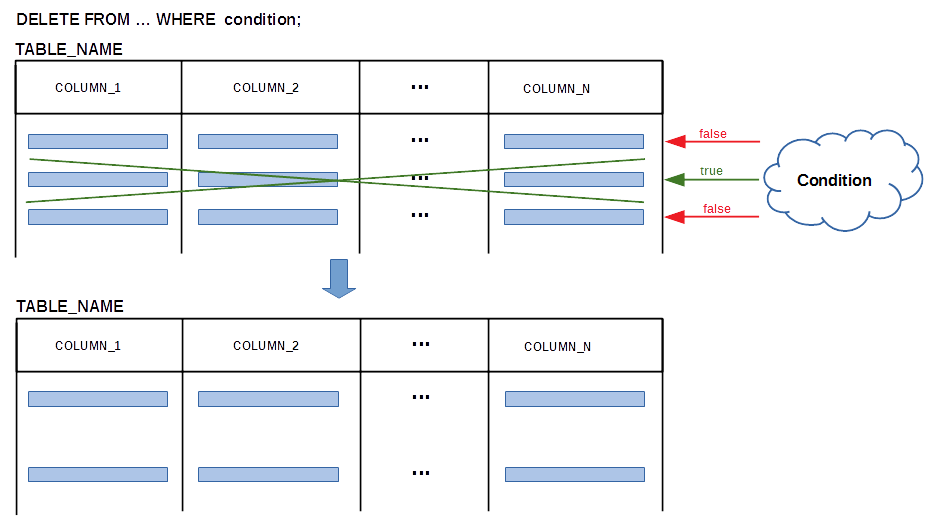
DELETE statement
- Sample database:
CREATE TABLE DEPARTMENT(
 name               VARCHAR(50)        NOT NULL,
 code               CHAR(5)            NOT NULL,
 total_staff_number DECIMAL(2)         NOT NULL,
 chair              VARCHAR(50)            NULL,
 budget             DECIMAL(9,1)       NOT NULL,
  CONSTRAINT dept_pkey PRIMARY KEY(name),
  CONSTRAINT dept_ckey1 UNIQUE(code),
  CONSTRAINT dept_ckey2 UNIQUE(chair),
  CONSTRAINT dept_check1 CHECK (total_staff_number BETWEEN 1 AND 50) );
 CREATE TABLE COURSE(
 cnum               CHAR(7)           NOT NULL,
 title              VARCHAR(200)      NOT NULL,
 credits            DECIMAL(2)        NOT NULL,
 offered_by         VARCHAR(50)           NULL,
  CONSTRAINT course_pkey PRIMARY KEY(cnum),
  CONSTRAINT course_check1 CHECK (credits IN (6, 12)),
  CONSTRAINT course_fkey1 FOREIGN KEY(offered_by)
                        REFERENCES DEPARTMENT(name) ON DELETE CASCADE );
DELETE statement
- Examples:
- Delete a course with a code CSCI235
DELETE FROM COURSE
WHERE cnum = 'CSCI235';
- Delete all courses with 12 credits or such that their title includes a word "database"
DELETE FROM COURSE
WHERE (credits = 12) OR (UPPER(title) LIKE '%DATABASE%');
DELETE FROM DEPARTMENT
WHERE total_staff_number < 5;
DELETE FROM DEPARTMENT;
DELETE statement
- BEWARE !!!
CREATE TABLE COURSE(
 cnum               CHAR(7)           NOT NULL,
 title              VARCHAR(200)      NOT NULL,
 credits            DECIMAL(2)        NOT NULL,
 offered_by         VARCHAR(50)           NULL,
  CONSTRAINT course_pkey PRIMARY KEY(cnum),
  CONSTRAINT course_check1 CHECK (credits IN (6, 12)),
  CONSTRAINT course_fkey1 FOREIGN KEY(offered_by)
                        REFERENCES DEPARTMENT(name) );
DELETE FROM DEPARTMENT WHERE name='Physics';
--------------
DELETE FROM DEPARTMENT WHERE name='Physics'
--------------

ERROR 1451 (23000): Cannot delete or update a parent row: a foreign key
constraint fails (`csit115`.`COURSE`, CONSTRAINT `course_fkey1`
FOREIGN KEY (`offered_by`) REFERENCES `DEPARTMENT` (`name`))
DELETE statement
- BEWARE !!!
- If ON DELETE CASCADE clause is not used in a specification of a foreign key then an order in which the rows are deleted is important !!!
- If ON DELETE CASCADE clause is used in a specification of a foreign key then deletion of a row with a respective value of primary key triggers automatic deletion of the rows with the same value of a foreign key
- Otherwise, the rows with the same value of a foreign key must be deleted first
DELETE FROM COURSE WHERE offered_by ='Physics';
DELETE FROM DEPARTMENT WHERE name='Physics';
SQL - Data Manipulation Language (DML)
Outline
INSERT statement
- Functionality:
- INSERT statement inserts a new row into a relational table and automatically verifies the consistency constraints
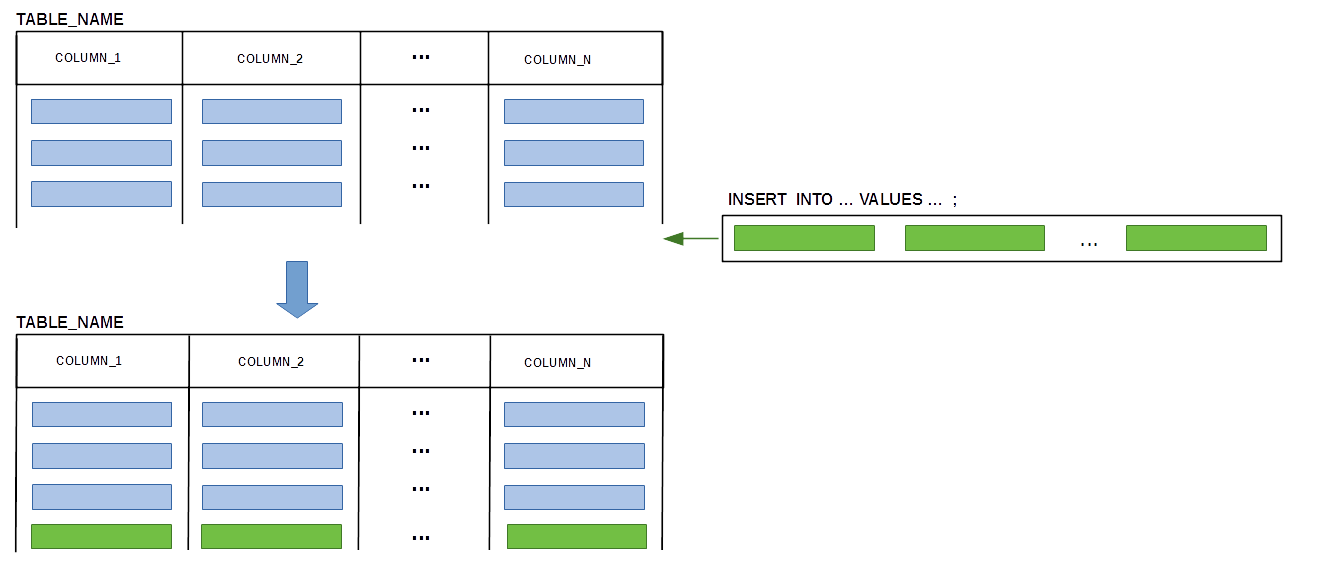
INSERT statement
- Sample database
CREATE TABLE DEPARTMENT(
 name               VARCHAR(50)        NOT NULL,
 code               CHAR(5)            NOT NULL,
 total_staff_number DECIMAL(2)         NOT NULL,
 chair              VARCHAR(50)            NULL,
 budget             DECIMAL(9,1)       NOT NULL,
  CONSTRAINT dept_pkey PRIMARY KEY(name),
  CONSTRAINT dept_ckey1 UNIQUE(code),
  CONSTRAINT dept_ckey2 UNIQUE(chair),
  CONSTRAINT dept_check1 CHECK (total_staff_number BETWEEN 1 AND 50) );
CREATE TABLE COURSE(
 cnum               CHAR(7)           NOT NULL,
 title              VARCHAR(200)      NOT NULL,
 credits            DECIMAL(2)        NOT NULL,
 offered_by         VARCHAR(50)           NULL,
  CONSTRAINT course_pkey PRIMARY KEY(cnum),
  CONSTRAINT course_check1 CHECK (credits IN (6, 12)),
  CONSTRAINT course_fkey1 FOREIGN KEY(offered_by)
                        REFERENCES DEPARTMENT(name) ON DELETE CASCADE );
INSERT statement
- Examples:
INSERT INTO DEPARTMENT
            VALUES ('Computer Science', 'CSCI', 30, 'Peter', 123456.9 );
INSERT INTO COURSE VALUES('CSCI235', 'Databases', 6, 'Computer Science');INSERT INTO DEPARTMENT(name, code, chair, budget, total_staff_number) VALUES ('Mathematics', 'MATH', NULL, 12345.6, 10);INSERT INTO COURSE(cnum, title, offered_by, credits) VALUES('MATH345', 'Topology', 'Mathematics', 6);
INSERT statement
- BEWARE !!!
INSERT INTO COURSE
            VALUES ('PHYS999','Special Theory of Relativity',6,'Physics');
-------------- INSERT INTO COURSE VALUES ('PHYS999', 'Special Theory of Relativity', 6, 'Physics') -------------- ERROR 1452 (23000): Cannot add or update a child row: a foreign key constraint fails (`csit115`.`COURSE`, CONSTRAINT `course_fkey1` FOREIGN KEY (`offered_by`) REFERENCES `DEPARTMENT` (`name`) ON DELETE CASCADE)
SQL - Data Manipulation Language (DML)
Outline
UPDATE statement
- Functionality:
- UPDATE statement modifies all rows that satisfy a given condition !
- The values of attributes modified by UPDATE statement CAN be restored by ROLLBACK statement unless UPDATE has been committed by COMMIT statement
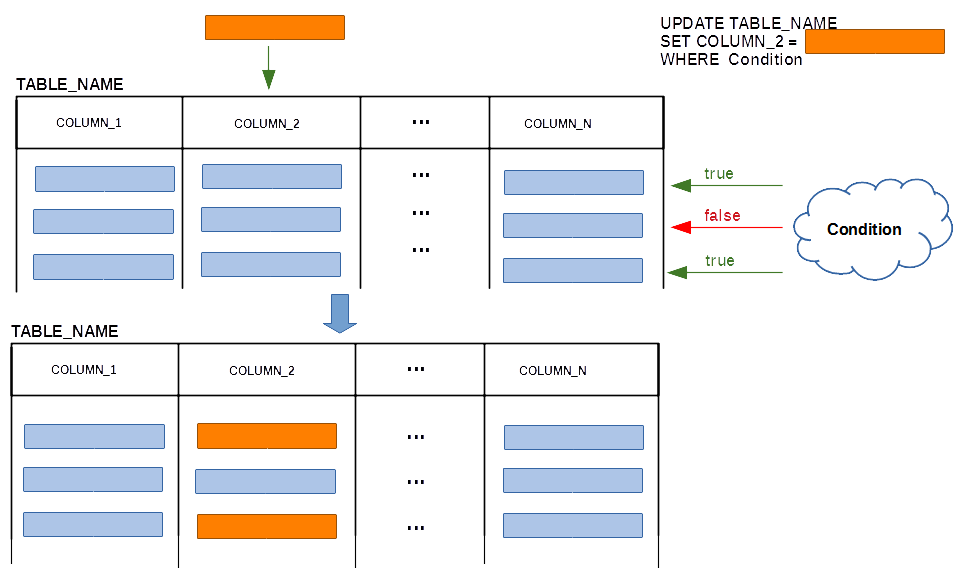
UPDATE statement
- Sample database
CREATE TABLE DEPARTMENT(
 name               VARCHAR(50)        NOT NULL,
 code               CHAR(5)            NOT NULL,
 total_staff_number DECIMAL(2)         NOT NULL,
 chair              VARCHAR(50)            NULL,
 budget             DECIMAL(9,1)       NOT NULL,
  CONSTRAINT dept_pkey PRIMARY KEY(name),
  CONSTRAINT dept_ckey1 UNIQUE(code),
  CONSTRAINT dept_ckey2 UNIQUE(chair),
  CONSTRAINT dept_check1 CHECK (total_staff_number BETWEEN 1 AND 50) );
CREATE TABLE COURSE(
 cnum               CHAR(7)           NOT NULL,
 title              VARCHAR(200)      NOT NULL,
 credits            DECIMAL(2)        NOT NULL,
 offered_by         VARCHAR(50)           NULL,
  CONSTRAINT course_pkey PRIMARY KEY(cnum),
  CONSTRAINT course_check1 CHECK (credits IN (6, 12)),
  CONSTRAINT course_fkey1 FOREIGN KEY(offered_by)
                        REFERENCES DEPARTMENT(name) ON DELETE CASCADE );
UPDATE statement
- Examples
- Change total number of credits to 12 for the courses CSCI235, CSCI205, and CSCI203
UPDATE COURSE SET credits = 12 WHERE cnum IN ('CSCI235', 'CSCI205', 'CSCI203'); - Change a name of chaiperson to Margaret and increase the total number of staff members by one in Department of Physics
UPDATE DEPARTMENT
SET chair = 'Margaret',
    total_staff_number = total_staff_number + 1
WHERE name = 'Physics';
UPDATE DEPARTMENT
SET total_staff_number = total_staff_number + 2;
UPDATE statement
- BEWARE !!!
UPDATE DEPARTMENT
SET name='IT'
WHERE name='Physics';
--------------
update DEPARTMENT set name ='IT' where name = 'Physics'
--------------

ERROR 1451 (23000): Cannot delete or update a parent row: a foreign key
constraint fails (`csit115`.`COURSE`, CONSTRAINT `course_fkey1`
FOREIGN KEY (`offered_by`) REFERENCES `DEPARTMENT` (`name`)
ON DELETE CASCADE)
- If ON UPDATE CASCADE clause is not used in a specification of foreign key then an order in which the rows are updated is important !!!
CREATE TABLE COURSE(
 cnum               CHAR(7)           NOT NULL,
 title              VARCHAR(200)      NOT NULL,
 credits            DECIMAL(2)        NOT NULL,
 offered_by         VARCHAR(50)           NULL,
  CONSTRAINT course_pkey PRIMARY KEY(cnum),
  CONSTRAINT course_check1 CHECK (credits IN (6, 12)),
  CONSTRAINT course_fkey1 FOREIGN KEY(offered_by)
                        REFERENCES DEPARTMENT(name) ON UPDATE CASCADE );
References
- C. Coronel, S. Morris, A. Basta, M. Zgola, Data Management and Security, Chapter 5 Introduction to Structured Query Language, Cengage Compose eBook, 2018, eBook: Data Management and Security, 1st Edition
- T. Connoly, C. Begg, Database Systems, A Practical Approach to Design, Implementation, and Management, Chapter 6.3.10 Database Updates, Pearson Education Ltd, 2015
- D. Darmawikarta, SQL for MySQL A Beginner’s Tutorial, Chapter 1 Storing and Maintaining Data, pages 7-12, Brainy Software Inc. First Edition: June 2014
- How to ... ? Cookbook, How to use data definition and basic data manipulation statements of SQL ? Recipe 4.2 How to insert data into the relational tables
- How to ... ? Cookbook, How to use data definition and basic data manipulation statements of SQL ? Recipe 4.3 How to delete and how to update rows in the relational tables ?